Imagine this: You’re away from home, and a package arrives. Who’s at your door? Or maybe you’re tucked in bed, and a strange noise jolts you awake. Is someone trying to get in? These are the moments when peace of mind feels miles away, and the need for a watchful eye becomes crystal clear.
Choosing a video smart lock can feel like navigating a maze. So many brands, so many features – it’s easy to get lost and wonder which one is truly the best for *your* home. You want security, convenience, and a clear view of who’s approaching, but figuring out where to start can be overwhelming. You might worry about battery life, ease of installation, or whether it will actually work with your existing door.
But don’t worry! By the end of this post, you’ll have a much clearer picture. We’ll break down the confusing jargon and highlight the key features that really matter, helping you find a video smart lock that fits your needs and budget perfectly. Get ready to unlock a smarter, safer way to protect your home.
Top Video Smart Lock Recommendations

- Smarter Front-Door Security with Video and Keyless Access: Get a clearer view of visitors with a 2K HD camera and f/1.6 lens, even after dark, and unlock in seconds with fast fingerprint recognition. Designed for everyday convenience and front-door awareness, Video Smart Lock E330 helps you stay connected to entry activity around the clock.
- Easy Access for Family, Guests, and Everyday Entry: Fast fingerprint recognition helps you unlock in seconds, while the eufy Security app, Alexa or Google Voice Assistant, keypad, and physical keys give everyone a convenient way to come and go.
- Remote Control from Anywhere: See who’s at your door and manage access remotely with the eufy Security app. Get real-time notifications for visitors and activity. Thumbnail preview images in push notifications are temporarily stored in the cloud.*
- Reliable Power for Everyday Front-Door Use: A large 10,000mAh rechargeable battery supports your lock and video features with dependable power, so your front door stays ready for daily entry, monitoring, and control.

- Palm Vein Unlocking: Unlock with advanced security and ultra-fast recognition in just 0.6 seconds. Forgery-resistant palm vein technology scans your unique vein patterns for added protection. All data is securely stored locally on the lock—keeping your privacy in your hands.
- This all-in-one device: A 2K HD camera with an f/1.8 lens for sharp, clear visibility—even at night. A video doorbell with a 150° Head-to-Toe wide-angle view that eliminates blind spots, perfect for monitoring packages or checking on visitors. A smart lock with real-time visitor alerts. Whether it's ensuring your family's safety or giving peace of mind when older people or children are home alone, the FamiLock S3 Max keeps you connected and reassured.
- The Rear Lock Video Screen: The Rear Lock Video Screen allows you to effortlessly check the front door status anytime, without needing a smartphone app. Its simple, intuitive design makes it ideal for the elderly and children, offering a quick and hassle-free way to see who’s at the door. Perfect for households seeking an easy-to-use, app-free solution for monitoring the front entrance.
- Dual Power Supply System: Stay powered with a rechargeable battery offering up to 4 months of full functionality, plus an emergency set of 4 AAA batteries for an extra month of essential functionality in case of power outages.
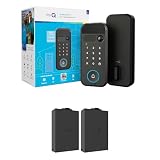
- What's Included: myQ Secure View 3-in-1 Smart Lock plus a spare rechargeable battery. A smart deadbolt, video doorbell, and 2K HDR camera in one device, with color night vision, two-way audio, and auto-lock. Swap batteries and keep going while one charges.
- Five Ways to Unlock: Face Access, fingerprint, PIN (up to 16 codes), the myQ app, or a backup key. Hands full? Face Access unlocks with a glance, no keys or phone needed. * *Face Access and fingerprint recognition are not available in Illinois, Texas, or outside the U.S. and Canada.
- Part of the myQ Smart Home System: See and control every way in and out of your home from one app, including your garage door, front door lock, video keypad, and cameras. Smart Secure (Premium) auto-locks your door and auto-closes your garage when people are detected.
- Always Free, Premium Optional: 24/7 live streaming and motion detection with notifications are always free. Premium Features add video history, smart detection for people, faces, packages, and vehicles, preview notifications, and Smart Secure, with a 30-day free trial.

- 5-in-1 Keyless Entry Smart Lock with Handle Set:Combines a WiFi video smart lock, 150° wide-angle camera, doorbell, fingerprint scanner, and keyless keypad in one complete unit with matching handle. Monitor your front door 24/7 with real-time HD video via the Tuya App—no doorbell press required. Ideal for homes, apartments, and rental properties.
- Multiple Secure Unlock Methods + Voice Control:Unlock effortlessly with fingerprint recognition, Tuya App remote control, keypad PIN (with anti-peeping virtual password), or backup mechanical keys. Also supports hands-free voice commands with Alexa and Google Assistant for true keyless convenience.
- Real-Time Video Monitoring & Dual-Way Intercom:Enjoy 24/7 live video feed and instant doorbell alerts through the Tuya App. See visitors clearly, talk to them in real time, unlock remotely, and review access logs—perfect for package deliveries, guests, or Airbnb hosts.
- Auto-Lock Timer & Weather-Resistant Build:Set adjustable auto-lock from 0–99 seconds so your door always secures itself. Features an anti-theft deadbolt and IP54 weatherproof design, operating reliably from -31°F to 158°F in rain, snow, or heat.

- 4-IN-1 ADVANCED SECURITY SYSTEM – Experience all-around protection with one device: fast fingerprint recognition with 100 fingerprint capacity, a built-in 720P camera, a doorbell, and a smart deadbolt.
- 6 FLEXIBLE UNLOCK METHODS – Unlock your door your way: fingerprint, PIN code, app remote control, voice commands with Alexa or Google Assistant, key fobs, or a physical key. Convenience and security are always accessible.
- SMART INDOOR DISPLAY FOR INSTANT VIEWING – See who’s at the door in real time without using a phone. The user-friendly indoor display offers instant visual confirmation, making it ideal for seniors and kids while enhancing home safety and family peace of mind.
- APP REMOTE CONTROL FROM ANYWHERE – Built-in 2.4GHz Wi-Fi lets you lock/unlock the door, view live video, and talk to visitors directly from your smartphone. If installed too far from the router or blocked by multiple walls, a Wi-Fi extender is recommended.

- What's Included: myQ Secure View 3-in-1 Smart Lock, myQ Chime for in-home alerts, and a spare rechargeable battery. A smart deadbolt, video doorbell, and 2K HDR camera in one device, with color night vision, two-way audio, and auto-lock.
- Five Ways to Unlock: Face Access, fingerprint, PIN (up to 16 codes), the myQ app, or a backup key. Hands full? Face Access unlocks with a glance, no keys or phone needed. * *Face Access and fingerprint recognition are not available in Illinois, Texas, or outside the U.S. and Canada.
- Part of the myQ Smart Home System: See and control every way in and out of your home from one app, including your garage door, front door lock, video keypad, and cameras.
- Always Free, Premium Optional: 24/7 live streaming and motion detection with notifications are always free. Premium Features add video history, smart detection for people, faces, packages, and vehicles, preview notifications, and Smart Secure, with a 30-day free trial.

- 3-in-1 Design: Smart deadbolt lock, video doorbell, and 2K HDR camera in one device. Lock/unlock remotely, see visitors, and get motion or doorbell alerts through the myQ app.
- Face Access: Hands full? Your door unlocks automatically using facial recognition, no keys or phone needed. * *Face Access and fingerprint recognition are not available in Illinois, Texas, or outside the U.S. and Canada.
- 24/7 Visibility: 2K HDR video, wide-angle lens, and color night vision let you see every detail day or night.
- Five Ways to Unlock: Face Access, fingerprint, PIN (up to 16 codes), the myQ app, or a backup key. Hands full? Face Access unlocks with a glance, no keys or phone needed. * *Face Access and fingerprint recognition are not available in Illinois, Texas, or outside the U.S. and Canada.

- Facial Recognition Unlocking: eufy Smart Lock E40 uses facial recognition to provide a faster, more effortless way to unlock your front door. Designed for everyday use, it offers a more natural keyless entry experience for the whole family. It works reliably across a wide range of users and everyday look changes, while all facial data is stored locally for complete privacy.
- All-in-One Device: combines a 2K HD camera, doorbell, and smart lock to keep every moment in sight and your home secure. The 2K camera delivers clear details day and night, while the 135° head‑to‑toe view provides full‑body coverage for easy monitoring of visitors and deliveries.
- Dual Power Supply: Stay powered with a 15,000mAh rechargeable lithium battery offering up to 6 months of full functionality, and an 800mAh built-in backup battery that automatically activates when power is low, ensuring uninterrupted operation.
- Easy Installation: Easy DIY installation with no drilling needed for most doors. Compatible with most standard US and Canadian single‑cylinder deadbolts (not for round or non‑standard faceplates, or mortise locks). IP65 waterproof and suitable for use in ‑22℉ to 158℉ temperatures.
Choosing the Right Video Smart Lock: Your Ultimate Guide
A video smart lock is more than just a lock. It’s a security system for your front door that lets you see who’s there and unlock your door from your phone. This guide will help you pick the best one for your home.
1. Key Features to Look For
When you shop for a video smart lock, keep these important features in mind:
HD Camera and Clear View
- Resolution: Look for at least 1080p HD video. This gives you a clear picture.
- Field of View: A wider angle lets you see more of your porch. Aim for 150 degrees or more.
- Night Vision: Good night vision is a must. It helps you see visitors even in the dark.
Smart Access Options
- Keypad: Many have a keypad for PIN codes.
- Fingerprint Scanner: Some offer fingerprint entry for quick access.
- App Control: You should be able to lock and unlock your door from a smartphone app.
- Voice Control: Compatibility with voice assistants like Alexa or Google Assistant is a big plus.
Two-Way Audio
This lets you talk to visitors through the lock’s speaker and microphone. You can tell the delivery person where to leave a package or greet friends.
Motion Detection and Alerts
Your lock should send you an alert on your phone when it detects movement. This helps you know if someone is approaching your door.
Storage Options
- Cloud Storage: Many services offer video storage in the cloud. There might be a monthly fee.
- Local Storage: Some locks use an SD card for local storage. This can save you money on subscriptions.
2. Important Materials
The materials used in a video smart lock affect its durability and look. Good locks use strong stuff.
- Metal Alloys: Most good locks use strong metal like zinc alloy or aluminum. This makes them hard to break.
- Weatherproof Seals: Look for locks that can handle rain, sun, and cold. They need to be sealed well.
- Durable Finishes: Finishes like brushed nickel or matte black resist scratches and wear.
3. Factors That Improve or Reduce Quality
Some things make a video smart lock better, while others can make it worse.
What Makes a Lock Great
- Easy Installation: A lock that’s simple to install saves you time and hassle.
- Reliable Connectivity: Strong Wi-Fi or Bluetooth connection is key. You don’t want your lock to be offline.
- Long Battery Life: Most smart locks run on batteries. Longer battery life means fewer changes.
- User-Friendly App: The app should be easy to navigate and control.
What Can Lower Quality
- Poor Camera Quality: Blurry images or bad night vision make the camera useless.
- Weak Wi-Fi Signal: If the lock can’t connect, it’s just a regular lock.
- Difficult App: A confusing app frustrates users.
- Short Battery Life: Constantly changing batteries is annoying.
- Cheap Materials: Locks made from plastic can break easily.
4. User Experience and Use Cases
How you use a video smart lock matters. It makes your life easier in many ways.
Convenience
Let guests in remotely. Grant temporary access to a dog walker or cleaner. No more hiding spare keys!
Security
See who’s at your door anytime. Get alerts for visitors or packages. Deter potential burglars.
Peace of Mind
Check if you locked the door after you left. Feel safer knowing your home is protected.
Whether you’re home or away, a video smart lock gives you control and security. Choose wisely to find the perfect fit for your home!
Frequently Asked Questions (FAQ)
Q: What is a video smart lock?
A: A video smart lock is a lock that lets you see who is at your door through a camera. You can also unlock your door using your phone or other smart devices.
Q: Do I need Wi-Fi for a video smart lock?
A: Yes, most video smart locks need Wi-Fi to send video and alerts to your phone. Some might also use Bluetooth.
Q: How do I install a video smart lock?
A: Many video smart locks are designed for easy DIY installation. You usually just need a screwdriver. Some may need professional installation.
Q: How long do the batteries last in a video smart lock?
A: Battery life varies by model and usage. Most last from a few months to a year. Some have rechargeable batteries.
Q: Can I still use a physical key with a video smart lock?
A: Some models have a backup keyhole. Others are keyless and rely on digital entry methods.
Q: What happens if my Wi-Fi goes out?
A: If your Wi-Fi is out, you might not be able to use the smart features like remote access or live video. You may still be able to unlock the door with a keypad or physical key if available.
Q: Are video smart locks safe from hacking?
A: Reputable brands use strong encryption to protect your data. Always keep your firmware and app updated for the best security.
Q: Can I give access to someone else?
A: Yes, you can create temporary or permanent access codes for family, friends, or service providers through the app.
Q: Do I need a subscription for video storage?
A: Many locks offer cloud storage with a monthly fee. Some also support local storage via an SD card, which usually doesn’t require a subscription.
Q: Will a video smart lock work on any door?
A: Most video smart locks fit standard doors. Check the lock’s specifications to ensure it fits your door’s thickness and backset.

Hi, I’m Mallory Crusta, the heart and mind behind LovelyPetSpot.com.. As a passionate pet enthusiast, I created this space to share my experiences, expertise, and love for all things pets. Whether it’s helpful tips, heartfelt stories, or advice for pet parents, my mission is to make the journey of caring for your furry, feathery, or scaly friends as joyful and fulfilling as possible. Join me in celebrating the incredible bond we share with our animal companions!