Ever felt the thrill of a roaring engine and the rush of wind as you hug a tight corner, all from the comfort of your own chair? For many, the dream of being a race car driver is alive and well, and PC racing simulator games are the closest most of us will get to that dream. But with so many games out there, picking the perfect one can feel like navigating a tricky chicane without a guide.
The world of PC racing simulators is vast and exciting, offering everything from realistic track racing to off-road adventures. Yet, this very variety can be overwhelming. Do you want the ultra-realistic physics that demand precision driving, or a game that’s easier to pick up but still offers a good challenge? Deciding which simulator truly fits your style, your PC’s power, and your budget can be a real headache. You want a game that makes you feel like you’re really there, not one that leaves you frustrated.
This post is here to help you cut through the noise. We’ll explore what makes a great racing simulator and highlight some of the best options available today. By the end, you’ll have a clearer idea of which game will put you in the driver’s seat and deliver that authentic racing experience you’re craving. Get ready to find your next virtual racing obsession.
Top Pc Racing Simulator Games Recommendations

- Immersive Gaming Experience: Perfect for Xbox and PC gaming titles, the Driving Force simulates the feeling of driving a real car with precision steering and pressure-sensitive pedals
- Premium Control: The Driving Force feedback racing wheel provides a detailed simulation of driving a real car, with helical gearing delivering smooth, quiet steering and a hand-stitched leather cover
- Customizable Pedals: These pressure-sensitive nonlinear brake pedals provide a responsive, accurate braking feel on a sturdy base - with adjustable pedal faces for finer control
- 900-Degree Rotation: Lock-to-lock rotation of the Driving Force means you can turn the wheel around two and a half times, hand over hand on wide turns - just like a real F1 race car
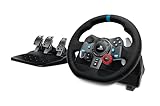
- Immersive Gaming Experience: Perfect for PlayStation 5, PS4 and PC gaming titles, the Driving Force simulates the feeling of driving a real car with precision steering and pressure-sensitive pedals
- Premium Control: The Driving Force feedback sim racing wheel and pedal set provides a detailed simulation of driving a real car, with helical gearing delivering smooth, quiet steering and a hand-stitched leather cover for this gaming steering wheel
- 900-Degree Rotation: Lock-to-lock rotation of the Driving Force means sim racers can turn the wheel around two and a half times while using their driving simulator, hand over hand on wide turns - just like a real F1 race car
- Customizable Pedals: These pressure-sensitive, nonlinear racing sim brake pedals provide a responsive, accurate braking feel on a sturdy base - with adjustable pedal faces for finer control and driving realism

- IMMERSIVE 3.2NM FORCE FEEDBACK RACING PERFORMANCE - The PXN V99 force feedback racing steering wheel delivers up to 3.2Nm torque, providing detailed and responsive feedback for road texture, cornering resistance, braking force, and vehicle dynamics. Designed for driving simulation and sim racing, it improves control, confidence, and overall racing performance.
- WIDE PLATFORM & RACING GAME COMPATIBILITY - The PXN V99 gaming steering wheel is compatible with PC (Windows 7/8/10/11), PS4, Xbox One, and Xbox Series X|S via USB wired connection. It supports a wide range of racing and driving simulator games, including Assetto Corsa Competizione, F1 2023, Dirt Rally 2.0, Project CARS 3, WRC 10, American Truck Simulator, BeamNG.drive, Gran Turismo 7, and more. (Original controller required for console pairing; not required on PC.)
- 11.8-INCH RACING WHEEL WITH ADJUSTABLE 270°/900° ROTATION - Features an 11.8-inch detachable racing wheel with a comfortable TPR rubber grip for long sim racing sessions. Equipped with 13 programmable buttons for precise control and a hardware switch to quickly select between 270° and 900° rotation, allowing players to adapt steering sensitivity to different racing styles and deliver accurate, responsive control for all types of racing and driving simulators
- COMPLETE PEDALS, SHIFTER & APP TUNING - Includes a Hall effect 3-pedal set (throttle, brake, clutch) and a 6+1 H-pattern shifter for realistic driving control in racing simulator setups. The PXN Wheel mobile app lets you adjust force feedback, steering angle, pedal response, and button mapping, providing a customizable racing wheel experience.

- High Compatibility: As a universally designed wheel stand, this bracket fits all racing wheels, pedals, and shifters. It is compatible with Logitech G25, G27, G29, G920, G923 Thrustmaster T300RS. Note: wheel, shifter, and pedals NOT included.
- Fully Adjustable: Steering wheel rack has 20 degree up and down adjustment, The height can be adjusted with a distance of 20CM by rotating the button, which brings the best driving experience to players of different sizes. Find your optimal driving posture for comfort and performance.
- Durable Metal Wheel Stand: This wheel racing stand is constructed with high-strength carbon steel, providing maximum stability and sturdiness for long time use. Even if you are playing a more intense game, there will be no obvious shaking.
- Folded for storage: After enjoying the game, you can easily fold this racing wheel stand and store it under your couch/bed or in the corner, making it a perfect choice for players with limited storage space. The compact design allows you to carry it anywhere to keep your gaming enthusiasm with you.

- 【Rock-solid & Stable Structure】ARES WING racing cockpit designed with upgraded strengthened frame structure which can firmly support each component and equipment, able to meet the force requirements of high-torque direct drive steering wheels such as Fanatec Pro. The bottom of the racing chair is equipped with 8 non-slip support feet for avoiding shaking or drifting during furious racing.
- 【Detachable Monitor Mount】By mounting the monitor on the racing simulator cockpit with TV mount, you can hit the track and start racing anytime anywhere without worrying about crowding the room or blocking the TV screen. The monitor stand features to hold screens up to 50" and 77 lbs, and VESA Patterns 75x75, 100x100, 200x100, 200x200, 300x200, 400x200.
- 【Universal Compatibility】Our race simulator cockpit is compatible with major brands of racing game accessories, such as Fanatec, Thrustmaster, Logitech, Moza, and also compatible with most gaming consoles, including PS5, PS4, Xbox and PC, it is the best partner for racing game enthusiasts. Note: shifter, pedal, steering wheel and TV are NOT included.
- 【Ergonomic Customization】To create a tailor-made sim cockpit and driving posture, this racing simulator can be flexibly adjusted to your driving habits. The seat offers 7.1" back and forth sliding, seat back offers 90° to 150° tilting, suitable for drivers of different heights. The steering wheel, pedals, shifter and monitor mount are all fully adjustable, and the shifter mount supports left or right install.
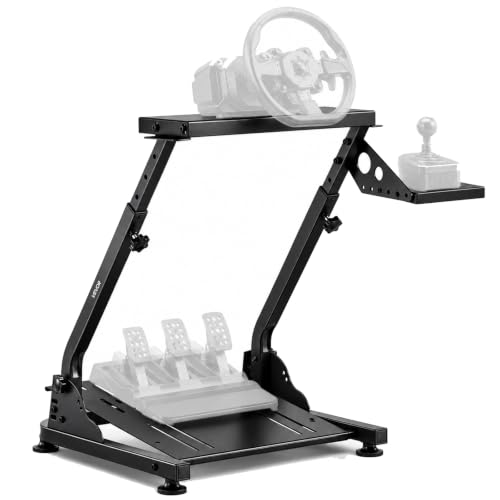
- Compatible with Major Brands: This racing wheel stand has pre-drilled holes to fit Logitech, Thrustmaster, Fanatec, Hori, Nintendo wheels, pedals, and shifters. such as Logitech G920, G25, G27, G29, Trustmaster T300RS, TX F458, T500RS, T3PA PRO (F1/GT) Fanatec, Hori, and Mad Catz. Upgrade accessories anytime without worrying about compatibility.
- Stable and No Shifting: Crafted from carbon structural steel, this sim racing stand stays firmly in place. Thick carbon steel plates and strong welds create a solid racing simulator cockpit for excellent stability and a realistic driving experience
- Fully Adjustable for Comfort: The steering wheel stand has adjustable height and angle. The shifter mount can be set left or right and adjusted in height. The pedal platform offers 3 tilt levels from 3° to 17° for ideal driving position every time
- Anti-Slip Chair Bar: A front crossbar at the base effectively blocks your chair wheels from sliding forward. Even during aggressive maneuvers, you’ll maintain a stable seating position throughout your racing session
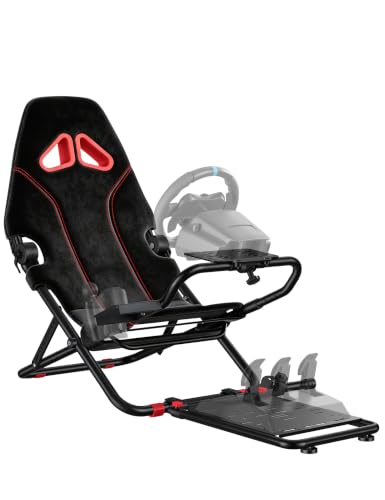
- Reclaim Your Room After Racing: Create a dedicated driving spot without leaving your room permanently set up for racing. This foldable racing simulator cockpit uses a folding mechanism that works without removing screws. Fold it away between sessions to free up space in an apartment, bedroom or shared living room
- A Connected Steel Base for Your Controls: Bring your seat, wheel deck and pedal platform together on one Q235 steel frame with triangular supports. Built with 25 mm diameter tubing and 1.2 mm walls, this sim racing cockpit supports a maximum user weight of 300 lb, giving your racing controls a dedicated base instead of spreading them across separate furniture
- Adjust Your Position, Settle into Faux Suede: Fine-tune wheel tilt, pedal distance and backrest angle to suit your driving posture. The shifter mount installs on either side for your preferred layout, while the faux suede seat cover provides a soft, velvety feel. Recommended user height: approximately 5 ft 3 in to 6 ft 3 in; fit varies with body proportions and control placement
- Less Assembly Before Your First Race: This racing cockpit with seat arrives 90% pre-assembled, so you can focus on the remaining setup and mounting your controls. Includes the cockpit frame, seat, wheel deck, pedal platform and shifter mount. Steering wheel, pedals and shifter are not included

- Load Cell Brake: Better muscle memory, optimal braking power; the 100kg load cell pressure detection brake delivers a superior driver feel and consistent car racing performance
- Customizable Sim Racing Pedals: Quickly adjust the feel of all three pedals with swappable gas/clutch springs and brake elastomers
- Fully Modular Design: Slide each pedal horizontally for perfect spacing or completely remove a pedal module for your preferred configuration
- Ultimate Durability: Developed with contactless Hall effect sensors, ensuring longevity and long-term accuracy
The Ultimate Buying Guide: Hit the Gas on PC Racing Simulators!
Ready to feel the rumble of the engine and the thrill of the race from your own PC? PC racing simulator games put you in the driver’s seat of some of the fastest cars on earth. This guide will help you pick the perfect game to zoom through.
1. Key Features to Look For: What Makes a Race Great?
When you’re choosing a racing simulator, think about what makes a race exciting for you.
Graphics and Visuals
Look for games with realistic graphics. This means cars that look like the real thing and tracks that feel like you’re actually there. Good lighting and detailed environments make a big difference.
Physics and Realism
A great simulator feels real. The cars should handle like real cars. This includes how they grip the road, how they slide, and how they react to bumps. Some games let you adjust how much realism you want.
Car and Track Variety
Do you love classic cars or supercars? Do you want to race on famous real-world tracks or fictional ones? Games with lots of different cars and locations offer more replay value.
Career Mode and Multiplayer
A good career mode lets you start from the bottom and work your way up to becoming a racing champion. Multiplayer lets you race against your friends or players from around the world. This adds a lot of fun and competition.
Customization Options
Some games let you tweak your car’s setup. You can change things like tire pressure or suspension to make the car handle just right. This is for players who want to get really deep into the details.
2. Important Materials: What You Need to Play
While the game itself is software, your computer is the important “material” for this experience.
- Powerful PC: Racing sims can be demanding. You’ll need a good processor (CPU) and graphics card (GPU) to run them smoothly.
- Good Monitor: A decent monitor helps you see all the action clearly.
- Steering Wheel and Pedals (Optional but Recommended): For the most realistic experience, a steering wheel and pedal set is highly recommended. It makes steering and braking much more natural.
- Comfortable Seat: You might be sitting for a while, so a comfortable chair is a good idea.
3. Factors That Improve or Reduce Quality: What Makes a Difference?
Certain things can make a racing simulator amazing or just okay.
Factors That Improve Quality
- Accurate Car Models: When cars look and sound like their real-life counterparts, it pulls you into the game.
- Detailed Track Recreations: Racing on a track that’s been scanned or recreated with great care feels authentic.
- Dynamic Weather and Time of Day: Racing in rain or at night adds challenge and visual appeal.
- Active Developer Support: Developers who regularly update the game with new content and fixes make the experience better over time.
Factors That Reduce Quality
- Poor AI (Artificial Intelligence): If the computer-controlled cars drive strangely or unfairly, it ruins the race.
- Clunky Controls: If the steering feels stiff or unresponsive, it’s frustrating.
- Lack of Content: A game with only a few cars or tracks can get boring quickly.
- Technical Glitches: Bugs or crashes can interrupt your race and ruin the fun.
4. User Experience and Use Cases: Who Plays and Why?
PC racing simulators are for a wide range of players.
For the Dedicated Enthusiast
Serious racing fans love these games because they offer a deep and realistic driving experience. They spend hours fine-tuning their cars and mastering tracks. They often use special racing wheels and cockpits.
For Casual Fun Seekers
Even if you’re not a hardcore fan, you can still enjoy racing sims. Many games have different difficulty settings, so you can make it as easy or hard as you like. They’re great for a fun evening with friends.
For Gamers Who Love Competition
Multiplayer modes are a big draw. Players can test their skills against others online, climb leaderboards, and join racing leagues. It’s a great way to stay engaged.
Use Cases
- Practicing for Real-Life Driving: Some people use simulators to improve their car control skills.
- Experiencing Exotic Cars: Drive cars you might never get to in real life.
- Relaxation and Stress Relief: For some, the focus and flow of racing can be very calming.
- Social Gaming: Competing with friends or joining online communities.
Frequently Asked Questions (FAQ)
Q: What’s the difference between a racing game and a racing simulator?
A: A racing game is usually more arcade-like, focusing on fun and speed. A racing simulator tries to be as realistic as possible, mimicking real-world car physics and handling.
Q: Do I need a steering wheel to play PC racing simulators?
A: While you can play with a keyboard or controller, a steering wheel and pedal set offers a much more immersive and realistic experience. It’s highly recommended for serious sim racers.
Q: Which PC racing simulator is best for beginners?
A: Games like “Forza Motorsport” or “Gran Turismo” (on PlayStation, but similar feel) often have good assists for new players. For PC, “Assetto Corsa” with assists on or “Project CARS 2” are good starting points.
Q: How much do PC racing simulators cost?
A: The games themselves can range from $20 to $60 or more. A good steering wheel setup can cost anywhere from $100 to over $1000.
Q: Can I play PC racing simulators on a laptop?
A: Yes, but you’ll need a gaming laptop with a powerful graphics card to run them smoothly. Not all laptops are capable of handling demanding racing sims.
Q: Are there free PC racing simulators?
A: Some simulators offer free demos or limited free-to-play versions. However, the most detailed and realistic simulators are typically paid products.
Q: What kind of computer specs do I need?
A: It depends on the specific game, but generally, you’ll want a modern multi-core processor, at least 8GB of RAM, and a dedicated graphics card (GPU) from the last few years.
Q: How important is multiplayer in racing simulators?
A: Multiplayer is very important for many players. It allows you to race against real people, which is often more challenging and exciting than racing against AI opponents.
Q: Can I race different types of vehicles?
A: Yes, many simulators offer a variety of vehicles, including F1 cars, GT cars, rally cars, and even trucks. The selection varies greatly from game to game.
Q: How can I improve my lap times in a racing simulator?
A: Practice is key! Learn the track layout, experiment with different car setups, and watch replays to see where you can improve. Many simulators also offer tutorials and practice modes.

Hi, I’m Mallory Crusta, the heart and mind behind LovelyPetSpot.com.. As a passionate pet enthusiast, I created this space to share my experiences, expertise, and love for all things pets. Whether it’s helpful tips, heartfelt stories, or advice for pet parents, my mission is to make the journey of caring for your furry, feathery, or scaly friends as joyful and fulfilling as possible. Join me in celebrating the incredible bond we share with our animal companions!