Ever feel like your current keyboard is holding you back? Maybe it’s a bit clunky, or the keys aren’t as responsive as you’d like. Finding a great keyboard doesn’t have to cost a fortune. But with so many choices out there, picking the perfect one for under $50 can feel like a treasure hunt with no map.
It’s tough to know which affordable keyboards are actually good. You want something that feels nice to type on, lasts a long time, and maybe even looks cool without emptying your wallet. This guide is here to help! We’ll dive into what makes a keyboard great, even on a budget, and show you how to avoid common mistakes.
By the time you finish reading, you’ll know exactly what to look for in a keyboard under $50. We’ll break down the features that matter and highlight some top picks that give you the most bang for your buck. Get ready to upgrade your typing experience without breaking the bank!
Top Pc Keyboard Under 50 Recommendations

- 【Dreamy Rainbow Gaming Keyboard】K521 Gaming Keyboard Adopts a Different LED Backlight Design, Upgraded on the Traditional LED Backlight Effect, Making the Light More Penetrating, Giving You a More Dazzling Visual Effect, Making Your Gaming Process More Enjoyable
- 【One Touch Opens & Visual Feast】The K521 Red Dragon Keyboard has a One-Touch on/off Lighting Button for Added Convenience. It also has a Three-Position Adjustable Breathing Mode and a Four-Position Adjustable Brightness Lighting Mode
- 【Mechanical Feeling & Fast Tapping】The PC Keyboard Keys are Designed for Mechanical Feeling, Giving You a Better Feel During Use and the Ability to Trigger Keys Quickly, Allowing You to Win All Your Games
- 【19 Keys Anti-Ghosting Keyboard】Anti-Ghosting Ensures Every Button Can Be Triggered. This Allows You to Trigger Key Combinations In The Game Accurately, And Each Skill Can Be Accurately Released to Increase Your Winning Rate. Redragon K521 Will Be Your Perfect Partner

- KEYBOARD: The keyboard works for Windows with hot keys that enable easy access to Media, My Computer, Mute, Volume up/down, and Calculator
- EASY SETUP: Experience simple installation with the USB wired connection
- VERSATILE COMPATIBILITY: This keyboard is designed to work with multiple Windows versions, including Vista, 7, 8, 10 offering broad compatibility across devices.
- SLEEK DESIGN: The elegant black color of the wired keyboard complements your tech and decor, adding a stylish and cohesive look to any setup without sacrificing function.

- The things you do most are right at your fingertips with one-touch controls for instant access to play/pause, volume, mute and the Internet.
- Comfortable low-profile keys: Enjoy fast, fluid quiet typing on a familiar standard layout, including number pad.
- High-definition optical mouse: Smooth, responsive cursor control from a comfortable sculpted mouse.
- Sleek and durable design: Thin profile, spill-resistant design, durable keys and sturdy adjustable tilt legs. Tested under limited conditions (maximum of 60 ml liquid spillage). Do not immerse keyboard in liquid.

- 【Lag-free & Efficient】Stable and reliable connection of wireless keyboard and mouse is up to 10m(33ft). This combo share a nano USB receiver, no need to take up additional USB ports (Also the wireless keyboard and mouse can also be used separately). Plug and play, no software needed,convenient and efficient.
- 【Quiet & Type in Comfort】Wireless keyboard come with adjustable height tilt legs to increase comfort and prevent your wrists injury when typing for a long time.Our wireless keyboard adopts a silent structure. Soft membrane keys provide a quiet and comfortable typing experience.The wireless mouse is quiet without any clicking sound also.So whether at home or in the office, you can use this combo as you please without worrying about disturbing others.
- 【Full Size Keyboard】This keyboard saves desktop space while retaining its full size.The full size wireless keyboard with numeric keypad and 12 multimedia shortcut keys, such as play/ pause, volume increase and decrease, and search, to help you improve work efficiency.
- 【Auto Power Saving Function】Wireless keyboard and mouse have a smart auto-sleep mode to save power for long battery life. They will enter sleep mode after stop using a while(Refer to the instructions for details). Unplug the receiver or after the PC shutdown, they will enter sleep mode too.You can press any keys to wake. (battery life may vary based on user and computing conditions)

- Brilliant Color Illumination- With 11 unique backlights, choose the perfect ambiance for any mood. Adjust light speed and brightness among 5 levels for a comfortable environment, day or night. The double injection ABS keycaps ensure clear backlight and precise typing. From late-night tasks to immersive gaming, our mechanical keyboard enhances every experience
- Support Macro Editing: The K671 Mechanical Gaming Keyboard can be macro editing, you can remap the keys function, set shortcuts, or combine multiple key functions in one key to get more efficient work and gaming. The LED Backlit Effects also can be adjusted by the software(note: the color can not be changed)
- Hot-swappable Linear Red Switch- Our K671 gaming keyboard features red switch, which requires less force to press down and the keys feel smoother and easier to use. It's best for rpgs and mmo, imo games. You will get 4 spare switches and two red keycaps to exchange the key switch when it does not work.
- Full keys Anti-ghosting- All keys can work simultaneously, easily complete any combining functions without conflicting keys. 12 multimedia key shortcuts allow you to quickly access to calculator/media/volume control/email

- 60% Compact Minimalism Layout: The 60 percent keyboard has a perfect size and it's good for Home、Office、Business or Travel use.You know,keyboard without numpad is most FPS gamers’ choice, more spaces left for mouse movements.
- Membrane But Mechanical Feeling keyboard: The bottom of the 61 response key cap is of silicone structure, and the key cap is sprayed with oil radium carving, which makes it feel skin-like and more comfortable.Using advanced imitation mechanical technology, one of the attractive features is the mechanical feeling.
- Ergonomic Designed: Key layout of the engineering assembly line.It adapts to the movement arc og the keyboard,and feels comfortables.Thus,the mini gaming keyboard key height is designed according to ergonomics,and it is not easy to fatigue after long-term use.
- RGB Backlit lighting Effect: There are 5 kinds of backlight effects, including normal light/wave/horse riding/breathing mode for choice, and 5 levels of brightness and speed for control. It also provides transparent and transparent backlight as well as letters.

- All-day Comfort: The design of this standard keyboard creates a comfortable typing experience thanks to the deep-profile keys and full-size standard layout with F-keys and number pad
- Easy to Set-up and Use: Set-up couldn't be easier, you simply plug in this corded keyboard via USB on your desktop or laptop and start using right away without any software installation
- Compatibility: This full-size keyboard is compatible with Windows 7, 8, 10 or later, plus it's a reliable and durable partner for your desk at home, or at work
- Spill-proof: This durable keyboard features a spill-resistant design (1), anti-fade keys and sturdy tilt legs with adjustable height, meaning this keyboard is built to last
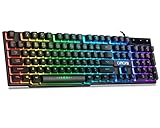
- With premium ABS,advanced craftsmanship on key caps,characters and symbols on keys will not worn off easily; Keystrokes of RGB gaming keyboard are easy to read with a light underneath the keys when backlit LED keyboards lights up; Water resistant keyboard features 12 multimedia shortcut keys for mail, calculator, sound and etc; 19 anti-ghosting keys offer a terrific response, letting fingers bounce from one key to another without any interference or lag. Not a Mechanical Gaming Keyboard but rainbow keyboard does have a very similar feel.
- USB wired keyboard boast 10 different color settings, possible to set RGB LED rainbow backlit wired keyboard up to light in one solid color, or multi colors. Color's speed, brightness or direction can be easily changed by pressing FN+ "=" /FN+ "-"; FN+PG UP/DN; FN+Left/Right arrow. Customizable Keyboard comes with user's manual about color adjustment.
- LED lights are impressive,making sense to make the numbers, letters, punctuation and f-keys be different colors; comfortable to use for gaming, great for office typing working ; Aesthetically appealing to family room or computer desk décor.
- Ergonomic keyboard has stands at the bottom of backlit gaming keyboard to adjust rgb keyboard height, for comfortable typing or gaming. USB light up keyboard has waterproof cable cord (about 4.59 IN). Gaming keyboard is great for writing emails, gaming purposes. A good wired keyboard to go with your light up mouse.
Finding Your Perfect PC Keyboard Under $50
So, you need a new keyboard but your wallet is feeling a little light? Don’t worry! Finding a great PC keyboard for under $50 is totally doable. This guide will help you pick the right one without breaking the bank.
What to Look For: Key Features
When you’re shopping for a budget keyboard, keep these important things in mind:
1. Type of Keyboard
- Membrane Keyboards: These are the most common and affordable. They use rubber domes under each key. They’re quiet and feel soft to type on. Most keyboards under $50 are membrane.
- Mechanical Keyboards (Rare but Possible): These have individual switches under each key. They feel clicky and satisfying. You might find a very basic mechanical keyboard on sale for under $50, but it’s less common.
2. Connectivity
- Wired: These keyboards plug into your computer with a USB cable. They’re reliable and don’t need batteries.
- Wireless: These connect without a cable, usually with a USB dongle or Bluetooth. They give you more freedom to move around. Make sure they come with batteries or have a good battery life.
3. Size and Layout
- Full-Size: These have all the keys, including a number pad on the right. They’re good for typing a lot or using spreadsheets.
- Tenkeyless (TKL): These are smaller because they don’t have the number pad. They save desk space and are popular with gamers.
- Compact: Even smaller, these might have fewer keys or combine some functions.
4. Extra Features
- Multimedia Keys: These let you control music volume, play/pause, and skip tracks easily.
- Backlighting: Some keyboards have lights under the keys. This helps you see in the dark. It’s usually a simple color, like white or blue, on budget keyboards.
Important Materials
Most keyboards under $50 use plastic for their bodies and keycaps. This keeps them light and cheap.
- ABS Plastic: This is a common and durable plastic used for keycaps. It can get a bit shiny over time with heavy use.
- Metal Accents: Some keyboards might have a metal top plate for a sturdier feel, but this is rare in the under $50 range.
Factors That Affect Quality
Several things make a keyboard good or not-so-good.
What Makes it Better:
- Sturdy Build: A keyboard that doesn’t flex or feel cheap when you type is a good sign.
- Responsive Keys: Keys should press down easily and register your typing without sticking.
- Comfortable Keycaps: The shape and texture of the keycaps can make a big difference in how your fingers feel.
- Good Cable (for wired): A thick, durable cable means it’s less likely to break.
What Can Make it Worse:
- Wobbly Keys: If keys feel loose or unstable, typing won’t be as enjoyable.
- Cheap-Feeling Plastic: Some plastics can feel brittle or easily scratched.
- Flimsy Stand: If the keyboard has little feet to prop it up, make sure they’re strong.
- Short Cable (for wired): A too-short cable can limit where you can place your keyboard.
User Experience and Use Cases
Who is a keyboard under $50 for? Pretty much everyone!
- Everyday Computer Use: If you use your computer for browsing the web, checking email, and simple tasks, a basic membrane keyboard is perfect. They’re quiet and comfortable for long typing sessions.
- Students: A reliable and affordable keyboard is essential for writing papers and doing homework. Wireless options are great for keeping your desk tidy.
- Gamers (Basic Needs): While hardcore gamers often opt for pricier mechanical keyboards, a decent membrane keyboard can still be good enough for casual gaming. Look for responsive keys and maybe some backlighting.
- Office Work: If you need a no-frills keyboard for your office setup, a quiet membrane keyboard is ideal. Multimedia keys can also be handy for managing audio during work.
Frequently Asked Questions (FAQ)
Q: What are the main Key Features to look for in a keyboard under $50?
A: You should look for the type of keyboard (membrane is common), how it connects (wired or wireless), its size (full-size, TKL, or compact), and any extra features like multimedia keys or backlighting.
Q: What materials are usually used for keyboards under $50?
A: Most keyboards in this price range are made of plastic for the body and keycaps.
Q: What factors improve the quality of a budget keyboard?
A: A sturdy build that doesn’t wobble, responsive keys that register easily, and comfortable keycaps all improve quality.
Q: What factors can reduce the quality of a budget keyboard?
A: Wobbly keys, cheap-feeling plastic, flimsy stands, and short cables can reduce quality.
Q: Are keyboards under $50 good for everyday computer use?
A: Yes, they are great for browsing, email, and general tasks. They are quiet and comfortable.
Q: Can students use keyboards under $50 for schoolwork?
A: Absolutely! They are reliable and affordable for writing papers and homework.
Q: Are these keyboards good for gaming?
A: For casual gaming, yes. They offer responsive keys, but serious gamers might want more advanced features.
Q: Do keyboards under $50 usually have backlighting?
A: Some do, but it’s usually a simple, single-color backlighting, not fancy RGB lights.
Q: What is the difference between a membrane and a mechanical keyboard?
A: Membrane keyboards use rubber domes and are quieter and softer. Mechanical keyboards have individual switches and offer a more tactile and audible typing experience.
Q: How long do keyboards under $50 typically last?
A: With good care, a well-made budget keyboard can last several years for everyday use.

Hi, I’m Mallory Crusta, the heart and mind behind LovelyPetSpot.com.. As a passionate pet enthusiast, I created this space to share my experiences, expertise, and love for all things pets. Whether it’s helpful tips, heartfelt stories, or advice for pet parents, my mission is to make the journey of caring for your furry, feathery, or scaly friends as joyful and fulfilling as possible. Join me in celebrating the incredible bond we share with our animal companions!