Remember those dusty CD collections piled up in your room? Maybe they’re still there, full of your favorite music from years ago. But how do you listen to those classic albums on your phone or computer today? The answer lies in ripping your CDs, and the good news is, you don’t need to spend a dime to do it!
Choosing the right free CD ripping software can feel like a treasure hunt with too many maps. You want something easy to use, that makes great quality copies, and doesn’t sneak in annoying ads or viruses. It’s frustrating when you download a program only to find it’s confusing or doesn’t work as well as you hoped. This is where we come in to help!
By reading on, you’ll discover the best free tools available to turn your old CDs into digital music files. We’ll show you what to look for, what makes a good ripper, and guide you toward the perfect software for your needs. Get ready to unlock your music library and enjoy your favorite tunes anywhere, anytime.
Top Free Cd Ripping Software Recommendations

- Perfect quality CD digital audio extraction (ripping)
- Fastest CD Ripper available
- Extract audio from CDs to wav or Mp3
- Extract many other file formats including wma, m4q, aac, aiff, cda and more

- Perfect quality CD digital audio extraction (ripping)
- Fastest CD Ripper available
- Extract audio from CDs to wav or Mp4
- Extract many other file formats including wma, m4q, aac, aiff, cda and more
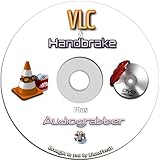
- Simple, Powerful and Fast
- Plays everything, Files, Discs (DVD, CD, VCD, Blu-Ray), Webcams and Streams
- Plays most codecs with no codec packs needed: MPEG-2, H.264, DivX, MPEG-4, WebM, WMV
- Includes a versatile Media Converter and Streamer

- Perfect quality CD digital audio extraction (ripping)
- Fastest CD Ripper available
- Extract audio from CDs to wav or Mp3
- Extract many other file formats including wma, m4q, aac, aiff, cda and more
- Simple, Powerful and Fast
- Plays everything, Files, Discs (DVD, CD, VCD, Blu-Ray), Webcams and Streams
- Plays most codecs with no codec packs needed: MPEG-2, H.264, DivX, MPEG-4, WebM, WMV
- Includes a versatile Media Converter and Streamer

- Experience High-Speed Read/Write: This Type-C & USB 3.0 external CD/DVD drive delivers blazing-fast performance with up to 8x DVD rewrite/read speed and 24x CD write/read speed. Leveraging dual Type-C and USB 3.0 connectivity, it achieves maximum 5Gbps data transfer rates – ensuring seamless playback of music and movies, smooth software/system installation, and error-free disc burning
- Plug and play, no driver required: Our product design is simple, providing a worry free experience - just plug it in, no need to install complex drivers. This design ensures efficient user use and provides users with a direct digital experience. Our product comes with USB-A and USB-C interfaces, and we believe these interfaces can adapt to your device and bring portable CD burning functionality to your laptop
- Broad Compatibility:Our product is engineered for extensive compatibility, adapting to various formats and devices. Whether you're working on a PC, Mac, or other platforms(except for Chromebook, car platforms, tablets, and televisions), it effortlessly integrates into your digital ecosystem. With wide-ranging support for different file types and operating systems,you can trust our products to provide you with excellent experiences in CD burning, DVD burning, CD reading, and other aspects
- Portable and Lightweight:Our optical drive stands out with its exceptional portability and lightweight design, measuring just 0.79 inches thick and weighing only 0.55 pounds. It easily fits into your handbag or backpack, making it perfect for use at the office, home, or on the go. Made from high-quality materials and featuring a sleek, minimalist design, this external cd/dvd drive is not only stylish and durable but also incredibly convenient . It supports multiple disc formats, offering you a seamless digital experience. Choose our optical drive and let portability and lightness become your trusted companions
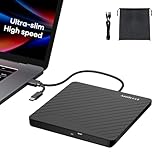
- Ultra-Slim & Truly Portable – At only 0.5in thick and weighing a mere 7.35 ounces, this external CD/DVD drive is slimmer than most smartphones. Its sleek, pocket-sized design ensures you can easily carry it in your laptop sleeve or backpack or briefcases, making disc access effortless whether you’re at home, in the office, or traveling. Double ended USB cord fits perfectly into the groove at the bottom, ensuring tangle-free storage and instant deployment. No loose cables, no clutter—just seamless functionality wherever you go
- Plug & Play with Universal Compatibility –Supports a wide range of optical media formats for both playback and recording. CD formats: CD-ROM, CD-R, CD-RW; DVD formats: DVD-ROM, DVD-R/RW, DVD+R/RW, DVD-R DL, DVD+R DL; VCD, SVCD discs. Note: Blu-ray disc is NOT supported.Equipped with USB A & USB-C(Type-C) interfaces, works instantly with laptop or desktop PCs running Windows 11/10/8/7/XP/Vista, Linux, or MacBook, iMac. Simply connect the included USB cable, and it’s ready to read or write your CDs and DVDs. (Chrome os, Smartphones, iPads/Tablets, TVs and Cars are NOT compatible.)
- Fast, Reliable CD/DVD Reader, Also Burner & Multi-Functional Performance –Advanced error-correction technology eliminates disc skipping and ensures lag-free streaming. USB 3.0/Type-C connectivity guarantees stable data transfer. Go beyond just reading discs. This drive smoothly burns music CDs, data DVDs, and video discs at a speeds of 24X CD / 8X DVD. You can use it to backup data, burn copies of your CDs, install software, and create home videos on DVDs (weddings, vacations, birthday) faster and more easily, saving hours in bulk operations. Recommended media player: VLC media player, Kmplayer
- Ideal for Modern Digital & Legacy Needs – Perfect for installing old software or games, converting family DVD collections to digital files, burning photo albums as gifts, pre-burning audio CDs used in vehicles without Bluetooth, or accessing archival work documents stored on disc. This innovative cd/dvd player introduces a dedicated charging port complemented by a separate power cord, specifically developed to resolve USB power delivery limitations prevalent in ultra-thin laptops. Enables full-speed data transfers, fluent disc reading/ripping/writing, and simultaneous device charging without compromising performance. Bridges the gap between today’s computers and yesterday’s media

- ⭐ External CD/DVD Drive for Laptop Mac:Our portable cd/dvd player for laptop computer is a perfect solution for anyone looking to read and write CDs and DVDs on their devices.It not just an external dvd player for laptop PC, but a CD/DVD burner, writer, and ripper.This external optical drive will help you listen to music, watch movies, install software, or burn files. This external cd burner for laptop PC Mac makes a fantastic gift for family and friends.
- ⭐ Fast 2-In-1 USB 3.0 Data Cable:The cd reader for laptop has USB 3.0 type-A and type-C two kinds of connectors, the usb dvd drive external can connect different laptop or desktop computers. USB 3.0 provides data transfer rates of up to 5 Gigabits/s,approximately 10 times faster than USB 2.0.
- ⭐ Dual Chip & High-Speed of Writing and Reading:This usb external dvd drive for pc laptop mac supports Max 24x CD Write/Read Speed and Max 8x DVD Write/Read Speed. USB external cd drive for laptop pc mac is equipped with a brand-new movement that features strong error-correcting, low impedance, and anti-interference ability, guaranteeing stable, quiet, and smooth operation.This usb cd/dvd external drive was quite, as quite as the OEM internal drive almost.
- ⭐ Plug and Play:Pretty quick and easy to running. Just plug it into your USB-A or USB-C port and the DVD driver will be detected.Don’t need to install software to set up driver. Our cd rom external drive for laptop will recognize CDs and DVDs automatically.
The Ultimate Buying Guide: Free CD Ripping Software
Do you have a stack of old CDs gathering dust? Want to listen to your favorite albums on your phone or computer? CD ripping software lets you copy the music from your CDs into digital files. This guide will help you pick the best free software for your needs.
Key Features to Look For
Audio Format Support
Different software supports different audio formats. MP3 is popular because it’s small. FLAC and ALAC are better for sound quality but take up more space. Look for software that lets you choose the format you want.
Speed and Efficiency
Some programs rip CDs faster than others. If you have many CDs, a faster ripper saves you time. Look for reviews that mention ripping speed.
Metadata Tagging
Good software automatically finds song titles, artist names, and album art. This makes your music library organized. Some programs let you edit these tags yourself.
Batch Ripping
This feature lets you rip multiple CDs at once. It’s a huge time-saver if you have a large collection.
Ease of Use
A simple interface makes ripping CDs easy. You shouldn’t need to be a computer expert to use it.
Important Materials (What Your Software Needs)
Free CD ripping software doesn’t need special “materials” like physical products. However, it relies on certain things working well:
- A Working CD/DVD Drive: Your computer needs a drive that can read CDs.
- Enough Storage Space: Digital music files take up space on your computer or device.
- Internet Connection: Many programs need the internet to find album information.
Factors That Improve or Reduce Quality
Improving Quality
- High Bitrate: For MP3s, a higher bitrate (like 320 kbps) means better sound.
- Lossless Formats: FLAC or ALAC keep the original sound quality.
- Accurate Rip Settings: Some software has settings to check for errors and ensure a perfect copy.
Reducing Quality
- Low Bitrate: Using a low bitrate for MP3s makes the file smaller but sounds worse.
- Compression Artifacts: Over-compressing audio can create unwanted sounds.
- Errors During Ripping: Scratched CDs or software glitches can cause pops or skips.
User Experience and Use Cases
User Experience
The best programs are intuitive. You should be able to insert a CD, choose your settings, and start ripping with just a few clicks. Clear instructions and helpful tips make a big difference.
Use Cases
- Building a Digital Music Library: Copy your entire CD collection to your computer.
- Creating Playlists for Your Phone: Rip your favorite albums to listen to on the go.
- Archiving Old CDs: Save your music before your CDs get damaged.
- Sharing Music (Legally): Rip your own CDs to create backups or share with family.
Frequently Asked Questions (FAQ)
Q: What is CD ripping?
A: CD ripping is copying music from a CD to a computer as a digital audio file.
Q: Do I need to pay for good CD ripping software?
A: No, there are many excellent free CD ripping programs available.
Q: What is the best audio format for ripping CDs?
A: It depends on your needs. MP3 is good for small files. FLAC or ALAC offer the best sound quality.
Q: Will ripping CDs hurt my CDs?
A: No, the ripping process does not damage your CDs.
Q: How long does it take to rip a CD?
A: Ripping a CD usually takes 5-10 minutes, depending on the software and your computer.
Q: Can I rip multiple CDs at once?
A: Some software offers batch ripping, which lets you rip several CDs in a row.
Q: What if my CD is scratched?
A: Some advanced ripping software can attempt to correct errors from scratched CDs.
Q: How do I organize my ripped music?
A: Most ripping software automatically adds song titles and artist names. You can also edit these “tags” later.
Q: Where can I find free CD ripping software?
A: You can find it on reputable software download websites or through product reviews.
Q: Is it legal to rip my own CDs?
A: Yes, in most countries, it is legal to make a backup copy of music you own for personal use.

Hi, I’m Mallory Crusta, the heart and mind behind LovelyPetSpot.com.. As a passionate pet enthusiast, I created this space to share my experiences, expertise, and love for all things pets. Whether it’s helpful tips, heartfelt stories, or advice for pet parents, my mission is to make the journey of caring for your furry, feathery, or scaly friends as joyful and fulfilling as possible. Join me in celebrating the incredible bond we share with our animal companions!