Have you ever felt lost trying to pick the perfect printing service for your business checks? It can feel like a huge task! Many small businesses need reliable, secure, and affordable checks, but sorting through all the different companies is tricky and time-consuming.
Choosing the wrong provider can lead to wasted money, security worries, and frustrating delays. You need a partner you can trust to handle your important financial documents without any hassle. That’s where Checks Inc. comes in.
This post dives deep into everything Checks Inc. offers. You will learn exactly what makes them stand out, what their customers really think, and how they compare to other major players. By the end, you will have the clear picture you need to decide if Checks Inc. is the right fit for your company’s needs.
Top Checks Inc Recommendations

- Accommodates accounts payable, payroll and general purpose functions
- These blank computer laser and ink jet checks are compatible with all computer software on the market
- These checks have multiple security features including micro print borders, void pantographs, and artificial watermarks
- These checks also have two detachable vouchers allowing you to keep one, and send one voucher to vendor or customer

- Form Size: 8.5" x 11", 28# paper with toner adhesion
- Check Size: 7 1/2" x 2 13/16"
- Please Note: These checks are blank and contain no personal information
- Z-Fold

- Form Size: 8.5" x 11", 28# MOCR paper
- Check Size: 7 1/2" x 2 13/16"
- Please Note: These checks are blank and contain no personal information
- Z-Fold

- Business Payments: Suitable for accounting records, vendor payments, paycheck processing and daily financial operations; designed for reliable check printing
- Accounting Software Compatibility: Compatible with QuickBooks and other accounting software workflows; suitable for printable checks and payment documentation
- Printer Ready Format: Blank check stock on standard 8.5 x 11 in sheets; individual check size 3.5 x 8.5 in; compatible with laser and inkjet printers; designed as check paper for printer use
- Document Protection: High security check paper with artificial watermark, microprint border, warning box, hidden void technology and additional security features

- Blank white check paper to create & print customized check backgrounds and colors that comply 100% with ANSI X9 banking standards.
- Save 50-80% or more per pack vs. pre-printed mail order checks, part of a complete line of 100% bank compliant check writing supplies.
- Includes matching print Validation code. Additional print codes included FREE in all VersaCheck Refills, Versaink MICR ink cartridge & VersaToner MICR toner cartridge packages.
- Contains letter-size 24lb security blank check sheets, one business-size check on top, two stubs below.
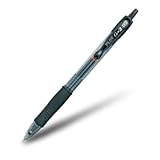
- Pricing is for 3 security pens
- Black ink
- Use this pen with: Checks, tax forms, contracts, prescriptions
- Ink is fade and water resistant

- Check on the top, sheet size: 8.5" x 11", check size: 3.5", 7" and 10.5"
- Blank check paper designed to work with laser ink and jet printers
- Compatible with: versacheck, QuickBooks, Quicken, MS money, and more
- Bonus value: free download of versacheck Presto check creation software

- Check on the top, sheet size: 8.5" x 11", check size: 3.5", 7" and 10.5"
- Blank check paper designed to work with laser ink and jet printers
- Compatible with: versacheck, QuickBooks, Quicken, MS money, and more
- Bonus value: free download of versacheck Presto check creation software
Your Essential Buying Guide for Checks Inc. Products
Welcome to the smart shopper’s guide for everything Checks Inc. Whether you need new business checks, personal checks, or custom stationery, knowing what to look for makes all the difference. This guide helps you pick the best quality and value.
Key Features to Look For
When buying checks, certain features really matter for security and ease of use. Don’t just pick the cheapest option. Look closely at these points:
- Security Level: Higher security means your money is safer. Look for checks with advanced security icons or descriptions.
- Check Numbering: Ensure the check numbering system is easy to track. Sequential numbering helps you keep your records straight.
- Customization Options: Can you easily add your logo, specific fonts, or unique layouts? Good customization makes ordering easy later.
- Reorder Simplicity: The best companies make reordering quick. Check if they save your previous designs online for fast future purchases.
Important Materials Used in Check Printing
The paper your checks are printed on affects how long they last and how secure they feel. Quality matters here.
Paper Stock Weight
Checks Inc. often uses different paper weights. Heavier paper (higher GSM or pound rating) feels sturdier. Thin paper might tear easily in the checkbook.
Security Features Embedded
Top-tier checks use special paper. Look for features like:
- Watermarks: These appear when held up to the light.
- Heat-sensitive Inks: These inks change color if someone tries to copy the check using a copier.
- Toner Adhesion Protection: This special coating stops fraudsters from lifting printed information off the check.
Factors That Improve or Reduce Quality
What makes a good check great? And what makes a cheap check risky?
Quality Boosters
High-quality printing processes definitely improve checks. Crisp, clean printing prevents smudging. If the ink bleeds or looks fuzzy, that signals lower quality. Also, sharp, clear perforation between the check and the stub is a sign of good manufacturing.
Quality Reducers
Rushing the order often reduces quality. If Checks Inc. uses generic templates without much personalization, the result might be less secure. Avoid checks that use very thin paper, as these invite tampering.
User Experience and Use Cases
How you use your checks determines what style you need. Think about your daily routine.
Business Use
Businesses need high volume and maximum security. If you pay many vendors, you need checks that easily integrate with accounting software like QuickBooks. User experience here means fast processing times when ordering replacements.
Personal Use
Personal users usually prioritize aesthetics and simplicity. Do you want fun colors or classic designs? The user experience should focus on easy online design tools and quick delivery to your home mailbox.
Frequently Asked Questions (FAQ) About Checks Inc.
Q: How long does it usually take for Checks Inc. to deliver my order?
A: Delivery times vary based on your shipping choice and customization level. Standard shipping often takes 7 to 14 business days. Always check the estimated delivery date during checkout.
Q: Can I use my existing logo on my business checks?
A: Yes, most reputable check printers, including Checks Inc., allow you to upload your business logo. Make sure your logo file is high-resolution for the best print quality.
Q: Are Checks Inc. checks compatible with standard accounting software?
A: Generally, yes. Checks Inc. designs checks to meet MICR standards (the routing and account numbers at the bottom). This compatibility ensures they work well with most major accounting programs.
Q: What is the minimum order quantity for personal checks?
A: Minimum order sizes change, but typically, the smallest order for personal checks is 150 or 300 checks. You should check the product page for the current minimum.
Q: What security measures are included by default?
A: Standard checks usually include basic security features like microprinting and security warnings. You often pay extra for top-tier features like heat-sensitive ink.
Q: What should I do if I receive a misprinted check order?
A: Contact Checks Inc. customer service immediately. If the error is on their part, they generally offer a free reprint or a full refund quickly.
Q: Do they offer rush printing options?
A: Yes, most check companies offer expedited or rush printing and shipping for an added fee if you need your checks faster than the standard time frame.
Q: How can I ensure my bank routing number is correct?
A: Always double-check the routing and account numbers against a recent bank statement or deposit slip before finalizing your order. Errors here cause payment rejection.
Q: Are recycled paper options available?
A: Many companies are moving toward sustainability. Inquire directly with Checks Inc. about their specific eco-friendly or recycled paper options.
Q: Can I order deposit slips and envelopes from the same place?
A: Absolutely. Checks Inc. usually sells matching deposit slips, voucher checks, and envelopes, which keeps your stationery consistent and organized.

Hi, I’m Mallory Crusta, the heart and mind behind LovelyPetSpot.com.. As a passionate pet enthusiast, I created this space to share my experiences, expertise, and love for all things pets. Whether it’s helpful tips, heartfelt stories, or advice for pet parents, my mission is to make the journey of caring for your furry, feathery, or scaly friends as joyful and fulfilling as possible. Join me in celebrating the incredible bond we share with our animal companions!