Do you ever feel like your desk is a tangled mess of cables and devices? Many professionals juggle a work laptop, a personal computer, and multiple monitors all day. Constantly unplugging cords and moving your mouse between setups is not just annoying; it kills your productivity and wastes your valuable time.
This is where a dual monitor KVM switch changes the game. It allows you to control two computers with just one keyboard, one mouse, and two screens. However, picking the right one is often confusing. You might worry about screen resolution, port compatibility, or input lag. With so many technical specs to compare, it is easy to feel overwhelmed by the choices on the market today.
In this guide, we will clear up the confusion. You will learn exactly what to look for to ensure your setup runs smoothly. We break down the most important features in simple, easy-to-understand terms so you can stop guessing and start working efficiently. By the end of this post, you will have the confidence to pick the perfect switch for your specific needs.
Are you ready to reclaim your desk space and streamline your workflow? Let’s dive into the essential details you need to know before you buy.
Top Dual Monitor Kvm Switch Recommendations

- 【KVM Switch Dual Monitor】The kvm switch 2 monitors allows you to control two computers sharing two monitors with one set of keyboard and mouse,KVM switches support extended© mode.The kvm 2 monitors Includes DP and HDMI ports,so please make sure your computers/laptops/docking stations have DP+HDMI port,and KVM don't support the signal conversion function (HDMI input can only be output to a monitor with HDMI, DP input can only be output to a monitor with DP). The DP and HDMI ports of pc1 in on the product must be connected to the same computer,pc2 ditto
- 【Support Ultra HD 4K@60hz Visuals】The hdmi+ dp kvm switch 2 monitors support resolution up to 3840*2160@60Hz(4K@60hz) and is backward compatible with 4K@30Hz,and 1080P@60Hz, Immerse yourself in the world of crystal-clear images,Brings you realistic visual enjoyment . Note: If you need to output 4K@60Hz resolution, please make sure your HDMI cable, computer and monitor support 4K@60Hz
- 【Support 4 USB 3.0 Peripherals】The kvm switch 2 monitors 2 computers has 4 USB 3.0 ports for sharing mouse, keyboard, USB printers, scanners, etc.data transfer rate up to 5Gbp/s, which is 10 times faster than USB 2.0 ports. And is backwards compatible with USB 2.0 and USB 1.1 devices. Note:If the input USB3.0 ports are not connected or connected incorrectly, the USB device will not be recognized.Supports various systems such as Windows/Vista/XP and Mac OS, Linux and Unix, and is plug and play
- 【Two Switching Way】The displayport hdmi kvm dual monitor supports panel button and external wire controller switching.Using the wired extension button, you can place the KVM outside the work area, making your desktop cleaner and tidier.Or just press the panel button next to the indicator light to achieve one-click switching,Let you can save more time to do other things!NOTE: Keyboard shortcuts (hotkeys) toggles are not supported

- HDMI KVM Switch 2 Monitors 2 Computers: This KVM switch allows you to easily manage and switch between two computers with just one set of keyboard and mouse while simultaneously controlling two monitors. Support extend mode and mirror mode. Plug & play without any software installation or driver. This device is ideal for both professional and home office setups. (NOTE: This is HDMI KVM switch, not a DisplayPort KVM switch.)
- With 4 USB 3.0 Ports: This HDMI KVM switch has 4 USB 3.0 ports (3 USB-A+1 USB-C) for sharing mouse, keyboard, USB flash drives, printer, mobile hard drives, and other USB devices. USB 3.0 offers data transfer speeds of up to 5Gbps, which allows faster data transfer to make work more efficient. (NOTE: To ensure USB devices normal usage, please make sure to connect the power supply via the power adapter)
- HD Resolution 4K@60Hz: This KVM switches supports resolution up to 4K@60Hz, it also supports 4K@30Hz, 1080p or lower resolution. This dual monitor KVM switch also supports HDMI 2.0, HDCP2.2/1.4, 3D and HDR, HDR10+, which makes image display more exquisite and realistic, color is more bright and moving. (NOTE: To ensure the monitors work properly, please make sure the length of the HDMI cable connected to the output is within 3 meters 28AWG.)
- Two Switching Modes: It supports button switching and desktop controller switching, freely switch between 2 computers. With the desktop controller, you can place this monitor switch for 2 computers outside your work area, making your desktop cleaner and tidier. NOTE: EDID emulation is not supported. Not support Keyboard shortcuts (hotkeys) toggles

- Control 2 Computers With One Desk Setup: Simplify your workspace with a dual monitor KVM switch that lets you control two computers using one keyboard and mouse. Easily switch between your work PC, personal laptop, or gaming computer without unplugging cables or rearranging your setup. Compatible with Windows, Mac, laptops, desktops, and gaming PCs.
- Ultra HD 8K & 4K@120Hz Performance: Experience crystal-clear visuals with support for up to 8K@60Hz and smooth 4K@120Hz refresh rates. Perfect for gaming, video editing, graphic design, and professional multitasking without sacrificing image quality.
- Share USB Devices: This KVM switch comes with 4 USB 3.0 ports, delivering data transfer speeds of up to 5 Gbps—that's 10 times faster than USB 2.0. It's also backward compatible with USB 2.0 devices. You can use it to share a wide range of USB peripherals, including printers, scanners, webcams, and wired or wireless keyboards and mice. It supports Windows (including Vista and XP), Mac OS, Linux, Unix, and other operating systems.
- 2 Switching Modes: This HDMI KVM switch gives you two ways to switch between sources—using the onboard panel button or the included wired controller, both offering one-touch switching. Please also keep in mind: Keyboard hotkey switching is not supported on this model.
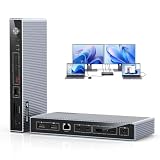
- 𝗞𝗩𝗠 𝗗𝗼𝗰𝗸 𝗳𝗼𝗿 𝟮 𝗟𝗮𝗽𝘁𝗼𝗽𝘀 𝗮𝗻𝗱 𝟮 𝗠𝗼𝗻𝗶𝘁𝗼𝗿𝘀: This KVM switch 2 monitors 2 computers lets two USB-C laptops share 2 HDMI monitors, one keyboard, one mouse and USB peripherals. Switch between work and personal laptops with one press, no cable swapping, helping you stay focused. Made for hybrid work, home offices and multitasking. Each laptop's USB-C port must support DisplayPort Alt Mode, dual extended displays also require MST. 𝗡𝗼𝘁𝗲: 𝗺𝗮𝗰𝗢𝗦 𝘀𝘂𝗽𝗽𝗼𝗿𝘁𝘀 𝗼𝗻𝗲 𝗲𝘅𝘁𝗲𝗻𝗱𝗲𝗱 𝗱𝗶𝘀𝗽𝗹𝗮𝘆 𝗼𝗻𝗹𝘆 (𝘀𝗲𝗰𝗼𝗻𝗱 𝗶𝘀 𝗺𝗶𝗿𝗿𝗼𝗿𝗲𝗱)
- 𝟭𝟮-𝗶𝗻-𝟭 𝗞𝗩𝗠 𝗗𝗼𝗰𝗸𝗶𝗻𝗴 𝗦𝘁𝗮𝘁𝗶𝗼𝗻: This dual monitor KVM switch features 2x HDMI outputs, 2x 10Gbps USB-C 3.2 ports, 1x 10Gbps USB-A 3.2, 1x 5Gbps USB-A 3.0, 2x USB 2.0, SD 3.0 and microSD 3.0 card slots, a 3.5mm audio jack, and a Gigabit Ethernet port. Ethernet follows the active input, so only one laptop can use the wired network at a time. A practical all-in-one pick for remote workers, consultants, developers, and small teams who want less clutter and faster setup
- 𝗘𝗗𝗜𝗗 𝗘𝗺𝘂𝗹𝗮𝘁𝗶𝗼𝗻 𝗳𝗼𝗿 𝗮 𝗦𝘁𝗮𝗯𝗹𝗲 𝗪𝗶𝗻𝗱𝗼𝘄 𝗟𝗮𝘆𝗼𝘂𝘁: The USB C KVM switch helps keep your monitor setup consistent when switching between laptops. EDID emulation maintains monitor recognition, helping your windows, desktop icons, and resolution stay in place—so you spend less time rearranging spreadsheets, browser tabs, code, or design files. Ideal for hybrid workers, engineers, and analysts who switch laptops constantly throughout the day
- 𝗖𝗿𝗶𝘀𝗽 𝗗𝘂𝗮𝗹 𝟰𝗞 𝗗𝗶𝘀𝗽𝗹𝗮𝘆𝘀 𝗳𝗼𝗿 𝗘𝗳𝗳𝗶𝗰𝗶𝗲𝗻𝘁 𝗪𝗼𝗿𝗸: TobenONE KVM switch dual monitor connects two HDMI displays at up to 4K@60Hz for sharp documents and code, smooth design previews, and ample screen space for email, meetings and reference materials. Perfect for office work, programming and design review.

- ⚠️ IMPORTANT NOTES BEFORE PURCHASE: 1. Ensure your computer natively supports dual external displays (M1/M2 Base MacBooks do NOT). 2. EACH computer MUST connect 2 HDMI + 1 USB cable. 3. Power adapter is NOT included. 4. EDID emulation & Hotkey switching are NOT supported
- 2 MONITORS, 2 COMPUTERS, ZERO CLUTTER: Share two HDMI displays and multiple USB peripherals between a work laptop and a personal PC. Supports extended or mirrored modes, seamlessly bridging your work and personal setups
- CRYSTAL CLEAR 4K@60Hz VISUALS: Built with HDMI 2.0, this KVM supports ultra-HD 4K@60Hz (YUV 4:4:4) and HDR, delivering vibrant colors for graphic designers and editors. Perfect for setups mixing different monitor resolutions
- SEAMLESS MULTITASKING & GAMING: Easily swap your dual-monitor workstation from a heavy-duty video editing Mac to a Windows PC, or even gaming consoles like PS5 and Xbox, with just one click of the wired remote

- KVM Switch 3 Monitors 2 Computers: This 2*Displayport + 1*HDMI KVM Switches allows you to switch effortlessly between two computers with one click — share 3 monitors and 4 USB 3.0 ports (keyboard, mouse, printer, webcam) without swapping cables. Space-saving KVM for home offices, content creators, and IT professionals. NOTE: Both computers must support triple-monitor output to use all 3 displays simultaneously. If either PC only supports 1 or 2 displays, the extra monitor(s) won’t activate
- Ultra HD 8K@60Hz/4K@240Hz Resolution: This USB KVM switch output features two DisplayPort 1.4 ports + one HDMI 2.1 port, each supporting up to 8K@60Hz resolution, and backward compatible with 8K@30Hz, 4K@240Hz/144Hz/120Hz/60Hz/30Hz. It also supports HDR10+, HDCP 2.3/1.4, VRR, FreeSync, and G-Sync, eliminating screen tearing and stuttering across three monitors, even at high frame rates. NOTE: If need to achieve 8K resolution, your computers and monitors both need to support 8K@60Hz resolution, and please make sure the length of your cables are within 2 meters 28AWG
- Two Switching Ways & Two Dispaly Modes: This KVM switch displayport HDMI supports button switching and desktop controller switching, freely switch between 2 computers. With the desktop controller, you can place this monitor switch for 2 computers outside your work area, making your desktop cleaner and tidier. Two Dispaly Modes, Mirror mode: Triple monitors output the same images, Extend mode: Triple monitors output different images. NOTE: Not support Keyboard shortcuts (hotkeys) toggles
- Wide Compatibility & Package List: This triple monitor KVM switch driver-free and plug and play, and supports Windows, and Linux systems. PACKAGE LIST: 1*KVM switch, 4*DP cables, 2*HDMI cables, 2*USB A cables, 1*power adapters, 1*desktop controller, 1*user guide

- Dual Monitor KVM Switch: This dual display KVM switch lets you control 2 computers with one keyboard and mouse set, share 4 USB devices across 2 monitors, and supports both copy mode (identical display on both screens) and extension mode (independent content per monitor); requires PC with 2 HDMI ports for extended display.
- Stunning Visual Effects: This 8K HDMI KVM switch supports resolutions up to 8K@60Hz and 4K@120Hz for ultra-sharp, vibrant images; backward compatible with 4K@60Hz, 1080P, and lower resolutions to work seamlessly with various HDMI devices.
- 4-Port USB 3.0 Hub: Features two HDMI ports and four USB 3.0 ports with 5Gbps data transfer speed—10x faster than USB 2.0, while remaining compatible with USB 2.0 devices. Share printers, scanners, webcams, wired/wireless keyboards & mice seamlessly between 2 computers. For high-power USB devices, use the included 12V power supply. Supports Windows, Vista, XP, Mac OS, Linux, and Unix systems.
- KVM Switch 2 Switch Mode: This HDMI KVM switch 2 in 2 out supports switching via panel buttons or the included external wire controller for one-key toggling between two signal sources. Note: This dual monitor KVM switch requires your computer to have dual graphics cards (2 HDMI output ports) and support copy/extend modes. If your PC only supports a single monitor, this product cannot enable dual monitor functionality. NOTE: Keyboard shortcuts (hotkeys) switching is not supported.
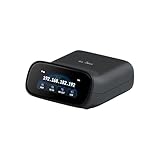
- 【Dual-Band Wi-Fi 6 Desktop KVM Device】Comet Pro supports both 2.4 GHz and 5 GHz Wi-Fi bands for a cleaner setup with less cabling. By providing both wired and wireless connectivity, it eliminates single points of failure and redefines flexibility for remote access.
- 【4K Video Passthrough & Two-Way Audio】The GL-RM10 features 4K@30FPS video passthrough and two-way audio, delivering ultra-clear, low-latency streams via H.264 encoding without interrupting the local display. Its audio support ensures crystal-clear voice interaction —ideal for remote meetings and IT support to create a natural "face-to-face" experience.
- 【Touchscreen Interface】The 2.22-inch built-in touchscreen features an intuitive user interface that is easy to operate and requires no technical expertise, allowing you to effortlessly view and manage important functions—such as connecting to Wi-Fi networks and enabling or disabling cloud services.
- 【Built-in Tailscale】 Enables secure, efficient data transfer between devices using WireGuard's encrypted transmission and direct connection features. Ideal for home labs, offices, and multiple networking scenarios.
The Ultimate Buying Guide: Choosing a Dual Monitor KVM Switch
A dual monitor KVM (Keyboard, Video, Mouse) switch is a powerful tool. It lets you control two computers using one set of monitors, a keyboard, and a mouse. This is perfect for people who work from home or have both a gaming PC and a work laptop. Follow this guide to pick the right one for your desk.
Key Features to Look For
First, check the video ports. Most modern switches use HDMI or DisplayPort. Make sure your monitors and computers have the same ports. Next, check the USB ports. You will need enough ports for your keyboard, mouse, and maybe a printer or webcam. Finally, look for switching speed. A good switch swaps between computers in one or two seconds.
Important Materials
Quality switches often use an aluminum alloy shell. Metal cases help the device stay cool during long work hours. They also protect the internal parts from accidental drops. Avoid cheap plastic boxes if you want the device to last for years. Also, look for gold-plated connectors. These prevent rust and keep your video signal clear.
Factors That Impact Quality
- Resolution Support: High-quality switches support 4K resolution at 60Hz. If the switch only supports 30Hz, your mouse might feel laggy.
- Power Supply: Switches that include an external power adapter are more stable. They do not rely on your computer’s USB power alone.
- Cables: High-speed HDMI cables are necessary for a crisp picture. Cheap, thin cables often cause screen flickering.
User Experience and Use Cases
Using a KVM switch simplifies your workspace. You can clear away extra keyboards and mice. This makes your desk look clean and professional. Use cases include:
- Remote Work: Quickly switch between your work laptop and your personal desktop.
- Content Creation: Use a powerful PC for editing and a laptop for research simultaneously.
- Gaming: Keep your high-end gaming monitor connected to both your console and your PC.
Frequently Asked Questions
Q: Do I need special software to use a KVM switch?
A: No. Most KVM switches are “plug and play.” You just plug in your cables, and they work immediately.
Q: Can I use a wireless mouse and keyboard?
A: Yes. You can plug the wireless USB receiver into the KVM switch. It will work just like a wired device.
Q: Will a KVM switch lower my gaming performance?
A: A high-quality switch will not lower performance. However, always use high-speed cables to prevent input lag.
Q: Can I connect more than two computers?
A: Most dual monitor KVMs are designed for two computers. You would need a specific 4-port model if you have more machines.
Q: Why is my screen flickering?
A: This is usually caused by a poor-quality HDMI or DisplayPort cable. Try using shorter, high-speed certified cables.
Q: Does the switch provide power to my laptop?
A: Standard KVM switches do not charge laptops. You will still need to plug your laptop into its own power charger.
Q: Can I use this with a MacBook?
A: Yes. You may need a USB-C to HDMI adapter if your MacBook does not have built-in HDMI ports.
Q: Is it possible to use a keyboard shortcut to switch computers?
A: Many models have a “hotkey” feature. You can press a button on your keyboard to switch between computers quickly.
Q: Does a KVM switch work with ultra-wide monitors?
A: It depends on the model. Check the specs to ensure the switch supports the wide resolution of your specific monitor.
Q: Do I need a KVM switch if I only have one monitor?
A: No. You can buy a simpler, cheaper KVM switch made for just one monitor.

Hi, I’m Mallory Crusta, the heart and mind behind LovelyPetSpot.com.. As a passionate pet enthusiast, I created this space to share my experiences, expertise, and love for all things pets. Whether it’s helpful tips, heartfelt stories, or advice for pet parents, my mission is to make the journey of caring for your furry, feathery, or scaly friends as joyful and fulfilling as possible. Join me in celebrating the incredible bond we share with our animal companions!