Remember those long car rides or quiet afternoons when you just wanted a fun way to pass the time? For many of us, our iPads have become trusty companions, especially when it comes to entertainment. But with so many games available, picking the perfect one can feel like a treasure hunt with no map!
It’s easy to get lost in the endless scroll of apps, wondering which ones are truly worth your time and money. Are you tired of downloading games that turn out to be boring or full of annoying ads? We’ve all been there, feeling a bit frustrated when our expectations aren’t met.
This post is here to help! We’ll explore some of the best iPad games out there, making it easier for you to find your next favorite adventure. Get ready to discover exciting new worlds, solve clever puzzles, and challenge your friends. Let’s dive in and find some amazing games that will keep you entertained for hours!
Top Games Of Ipad Recommendations

- Bluetooth Mobile Game Controller for Nintendo Switch 2 & iOS & Android & Tablets, Wireless Gamepad Grip with Hall Effect Trigger Joystick, Ergonomic Phone Controller for iPhone, iPad Pro, Samsung
- TURBO FUNCTION This MFi wireless controller has a turbo function, you can adjust the turbo button according to your needs and achieve one-click bursts, programming buttons are designed on the behind of the stretched gamepad, support macro programming, customise personalised game. making it easier for you to win in FPS games, and it is a good helper for you to play games.
- Hall effect joystick and linear trigger: mobile controller is with hall effect joystick, high precision, stable performance, faster response speed and long service life. Linear trigger has such high fluidity and response speed that gives you a competitive advantage in any game.
- ERGONOMIC DESIGN: Game accessory controllers are ergonomically designed to ensure flawless control and execution. The shape of the gamepad fits naturally in the hand, so you can better immerse yourself in the fun even during prolonged use. 360° rotating joystick analog sticks and trigger buttons ensure precise accuracy and comfort as well as increased sensitivity so you can better control your gaming remote control.

- OSMO IS MAGIC: Fun-filled & award winning learning games. Children interact with actual hand held pieces & an iPad, bringing a child's game pieces & actions to life (No WiFi necessary for game play). An Osmo Base is included, an iPad is not included, both are required for game play.
- TEACHING: Use the Osmo Base for iPad to play any of the Osmo games. An Osmo Base is required for game use. Ships with two games, solve creative physics puzzles by drawing lines or placing items in front of the screen (Newton) and learn to draw anything with creative drawing skills (Masterpiece). Osmo Projector works with the Osmo Base and reflector, helping teachers/students project their real written notes onto a professional-looking, virtual blackboard for conferencing or recorded lessons. Osmo Projector is an at-home learning tool that lets you broadcast your desk (Osmo Projector).
- SKILLS LEARNED: Visual thinking, problem solving, drawing, listening and physics. Osmo sees and reacts to every real-life move. Geared towards children & love of learning.
- CAPABILITY: Games are designed for beginner to expert levels. Osmo enables the continuation of learning. Real-time audio and visual feedback lets children learn through experimentation in a stress-free environment.
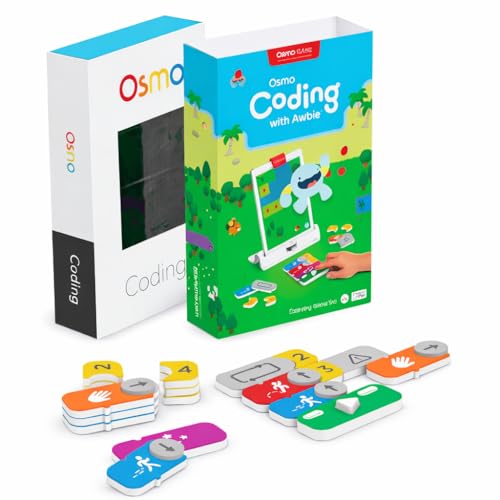
- OSMO IS MAGIC: Fun-filled & award winning learning games. Children interact with actual hand held pieces & an iPad or Fire Tablet, bringing a child's game pieces & actions to life (No WiFi necessary for game play). Osmo Base and iPad/Fire Tablet not included, required for game play.
- TEACHING: Use hands-on physical blocks, coding commands, to control the character Awbie on a fun-filled adventure (Coding Awbie), an introduction to coding. Use coding blocks to learn coding's creative side while developing an ear for rhythm, melody, and harmony - make your beat come alive, learn patterns & loops with over 300+ musical sounds (Coding Jam). Share a composed Jam with family, friends & the Jam community. Solve advanced side-by-side coding puzzles solo or with others, playing at their own level, using teamwork & strategy to unlock new worlds & coding 60+ puzzles (Coding Duo).
- SKILLS LEARNED: Logic, coding fundamentals, basics of programming, solve coding puzzles, teamwork, listening, critical thinking, observation, creative problem solving, music creation & pattern recognition. Osmo sees and reacts to real-life movement. Geared towards children & love of learning.
- AGE & CAPABILITY: Ages 5-10+. Games are designed for beginner to expert levels. Osmo enables the continuation of learning. Real-time audio and visual feedback lets children learn through experimentation in a stress-free environment.

- CURRICULUM-INSPIRED LEARNING: Learn addition & subtraction through hands-on play on a 1st & 2nd grade math adventure! Real-time targeted teaching tips and nudges let kids learn through experimentation and build confidence in a stress-free environment. Self-paced play means kids have time to master a concept before moving on to new material. Adults are able to adjust the difficulty of the game. (No WiFi necessary for game play). An Osmo Base for iPad & an iPad are not included, both are required for game play.
- TEACHING: Explore the village of Wyverndell with the wizard cat Mumbles! Brew potions with dragon claws & magic sparkles to master place value. Then, add & subtract balloons to help dragons fly. Learn new skills or get more practice: adding & subtracting within 20 using mental math, adding & subtracting within 100, counting & place value, comparing numbers, regrouping, understanding two-digit numbers, understanding the relationship between +/- and algebraic thinking.
- SKILLS LEARNED: This collection of games combines digital gameplay with active, hands-on learning methods to teach addition & subtraction. In Potions, learn how to add & subtract using number bonds while brewing magical mixtures. In Dragon Drop, master place value to help Dragons fly up & down using balloons. Card Duel teaches greater than & less than equations.
- AGE & CAPABILITY: Ages 6-8 (1st & 2nd grades). Games are designed for beginner to expert levels. Parents can select game level based on their child’s ability/skill level and opt in to receive emails with game results.
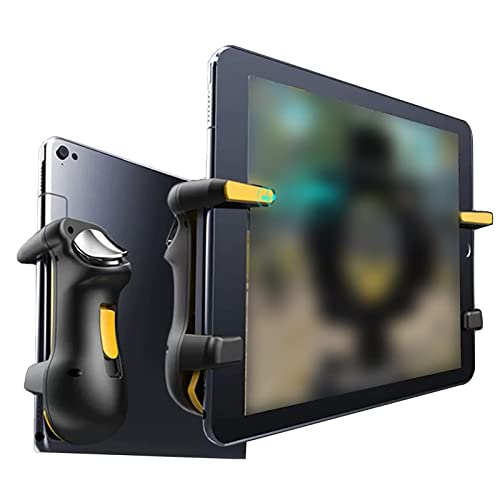
- ⚡ Ultra-Sensitive Capacitive Silicone Contact: Game trigger for pubg controller adopts highly sensitive capacitive silicone pads; zero-delay response, no Bluetooth/APP needed; directly triggers screen touch signals for precise aiming and shooting; trigger controller for ipad gaming accessories works like human finger touch, no damage to screen
- 📱Universal Compatibility for iPad & Android Tablets: 【Light Indicator】Solid red light indicates charging; solid green light indicates fully charged; pressing the trigger button will illuminate a solid blue light for single-fire mode, and flashing blue light for burst-fire mode
- 🎮4-Finger Linkage & Adjustable High Frequency: 【Mode Switching】Press and hold the power button to turn on, press and hold for 2 seconds to turn off. While powered on, briefly press the power button to switch between single-fire and burst-fire modes. In burst-fire mode, pressing and holding the trigger button while briefly pressing the power button will switch the burst-fire frequency between 8, 16, 24, and 32 times per second (recording settings)
- 🛡️Durable Build & Non-Slip Ergonomic Grip: 【Recording Function】In burst-fire mode, simultaneously press and hold the trigger button and the mode switch button. Rapidly flashing blue light indicates entry into recording mode. Clicking the trigger button initiates the recording process, recording your click frequency over the next 8 seconds. The recording is automatically saved to the recording file, overwriting the previous default speed. Recording can be repeated
- [Tool for photographer]: It is a Photography Accessories for Canon Nikon SLR Digital Camera. No App to be downloaded. 5 seconds after inserting the memory card and connecting with the iPhone, click 'Photos' APP and find 'Import', then import video and photos from memory card to your iPhone or iPad.
- [Accessories for iPhone with Dual Card Slots]: This SZHAIYIJIN Memory Card Reader for iPhone Support SD Card and TF Card, Secure Digital (Standard SD/SDHC) and Micro SD(TF) card. Do NOT Support Wi-Fi SD Memory card.
- [The Female USB Interface]: Lightning to USB adapter has the Female USB Interface is a OTG Camera Adapter for iPhone &iPad, supports Digital camera, SLR Camera, The USB camera adapter does not require an application, and there is no need to remove the camera's memory card. You Can also plug the USB Flash Drive, Card reader, USB Headphone, Electric Guitar, MIDI keyboard, etc. (The maximum current of the peripherals does not exceed 500 mA). Not Support the Printer and Hard disk drive.
- [Dual Connector Design]:The SD Card Adapter offers dual compatibility with USB-C and Light-ning ports (includes a detachable USB-C to Light-ning adapter). Simply plug the USB-C connector into modern devices like iPhone 15-17,iPad Pro, Mac, Android phones, or PCs, or attach the Lightning adapter for older Apple devices. This versatile setup enables seamless cross-platform data transfers — move photos, videos, and files between iOS, Android, Windows, and macOS systems with full OTG support.

- Turn Any Drawing Into A Real Game: Kids draw characters, obstacles, and worlds on paper with the 5 included non-toxic washable markers, snap a photo with their phone or tablet, and watch their sketch instantly come alive as an animated, playable video game. No drawing experience needed, a pizza, a wheel, or an epic knight works just as well as a detailed masterpiece. Positive screen time where kids create, not just consume
- 7 Epic Game Types to Draw & Play: Make platformers, draw slingshot games, design a golf course, build an epic maze or labyrinth, doodle your own pinball table, create arcade battle games, or go head-to-head with friends, every game is 100% original and created by your kid, with the only limit being their imagination
- Real Game Design Skills, Zero Homework Vibes: Pixicade teaches kids genuine design concepts, how to build characters, design obstacles, set goals, and craft plot twists through hands-on STEM-aligned play. Includes a 100+ page interactive booklet packed with step-by-step examples and tons of inspiration to keep kids creating. Smartphone and tablet compatible with iOS 9 or later or Android 6.0 or later. No subscription required to play, app is free to download with upgrades available
- Ultimate Gift For Kids & Teens: Looking for the perfect birthday gift, holiday present, graduation surprise, or just-because reward for a kid who loves games and creativity? You found it. Perfect for rainy days, after-school fun, family game nights, and travel. Includes 5 non-toxic washable markers and the 100+ page booklet, everything they need to start creating right out of the box

- OSMO IS MAGIC: Fun-filled & award winning learning games. Children interact with actual hand held pieces & an iPad, bringing a child's game pieces & actions to life (No WiFi necessary for game play). An Osmo Base for iPad is included, an iPad is not included, both are required for game play.
- TEACHING: Make pizza for customers, collect payment & make change (dollars/coins), & learn the profitability of your business. Additional game concepts include: Addition, Subtraction, Fractions, mental math, design and communication skills (Pizza Co. ).
- SKILLS LEARNED: Real-world (business) math, money, addition, subtraction, fractions, fast paced mental math, run & grow a business, social interaction, listening, critical thinking, oberservation, creative problem solving & basic business concepts. Osmo sees and reacts to every real-life move. Geared towards children & love of learning.
- AGE & CAPABILITY: Ages 5-12+. Game is designed for beginner to expert levels. Osmo enables the continuation of learning. Real-time audio and visual feedback lets children learn through experimentation in a stress-free environment.
Finding Your Next iPad Game Adventure
So, you’re ready to dive into the exciting world of iPad gaming! Your tablet is more than just a device for emails and browsing; it’s a powerful portal to endless fun. But with so many games available, how do you pick the best ones? This guide will help you navigate the app store and find games you’ll love.
Key Features to Look For
When choosing an iPad game, a few things really stand out.
Graphics and Visuals
- Amazing Artwork: Look for games with bright colors and cool designs. Games that look like cartoons or have detailed characters are often a blast.
- Smooth Animations: The characters and objects in the game should move without jumping or glitching. This makes playing much more enjoyable.
Gameplay and Controls
- Easy to Learn: The best games don’t make you read a giant manual. You should be able to pick them up and start playing quickly.
- Fun Challenges: Games need to be interesting. They should offer new things to do and keep you thinking.
- Responsive Touchscreen: The game needs to understand your taps and swipes perfectly. If you tap a button and nothing happens, it’s frustrating.
Sound and Music
- Catchy Tunes: Good background music can make a game feel epic.
- Cool Sound Effects: The sounds of actions, like jumping or collecting items, add to the fun.
Important Materials (App Store Information)
You won’t find physical materials for iPad games, but the information in the App Store is super important.
App Descriptions
- Read About the Game: The description tells you what the game is about and what you do in it.
- Check the Age Rating: This helps you know if the game is right for you.
User Reviews and Ratings
- See What Others Say: Real players leave comments. These are very helpful.
- Look at the Stars: Games with lots of stars are usually good.
Screenshots and Videos
- See the Game in Action: Pictures and videos show you what the game looks like before you download it.
Factors That Improve or Reduce Quality
Some things make a game great, while others can make it less fun.
Things That Make Games Better
- Regular Updates: Developers who update their games add new levels or fix problems. This keeps the game fresh.
- No Annoying Ads: Games that interrupt you with too many ads can be annoying.
- Fair Pricing: If a game costs money, it should be worth it. Free games should still be fun without forcing you to buy things.
Things That Make Games Worse
- Too Many Pop-up Ads: Ads that pop up in the middle of your game are a big problem.
- Games That Crash: If a game stops working or closes by itself, it’s not good.
- Confusing Controls: If you can’t figure out how to move or do things, you won’t want to play.
User Experience and Use Cases
How you play and what you use the game for matters.
For Fun and Relaxation
- Puzzle Games: These games make you think and are great for quiet time.
- Simple Arcade Games: Games like tapping to jump or collect coins are easy to play anywhere.
For a Challenge
- Adventure Games: These games often have stories and puzzles to solve.
- Strategy Games: You need to plan your moves carefully in these games.
For Playing with Friends
- Multiplayer Games: Some games let you play with friends online.
Frequently Asked Questions About iPad Games
Q: What are the main Key Features to look for in an iPad game?
A: The main Key Features are amazing graphics, smooth animations, easy-to-learn gameplay, fun challenges, responsive controls, catchy music, and cool sound effects.
Q: Where can I find important information about iPad games?
A: You can find important information in the app descriptions, user reviews and ratings, and by looking at screenshots and videos in the App Store.
Q: What makes an iPad game high quality?
A: High-quality games often have regular updates, minimal annoying ads, and fair pricing. They also have good graphics and smooth gameplay.
Q: What can make an iPad game less enjoyable?
A: Games with too many pop-up ads, games that crash frequently, and confusing controls can make them less enjoyable.
Q: What are some good iPad games for relaxing?
A: Puzzle games and simple arcade games are often good choices for relaxation.
Q: What kind of games are good for when I want a challenge?
A: Adventure games and strategy games usually offer a good challenge.
Q: Can I play iPad games with my friends?
A: Yes, many iPad games are multiplayer and allow you to play with friends online.
Q: Should I always download free games?
A: Free games can be fun, but sometimes they have a lot of ads or ask you to buy things often. It’s good to check reviews before downloading.
Q: How do I know if a game is appropriate for my age?
A: The App Store provides an age rating for each game. You should check this rating to see if the game is suitable for you.
Q: What is the best way to find new iPad games?
A: You can explore the “Games” section of the App Store, look at charts of popular games, and read reviews from game websites.

Hi, I’m Mallory Crusta, the heart and mind behind LovelyPetSpot.com.. As a passionate pet enthusiast, I created this space to share my experiences, expertise, and love for all things pets. Whether it’s helpful tips, heartfelt stories, or advice for pet parents, my mission is to make the journey of caring for your furry, feathery, or scaly friends as joyful and fulfilling as possible. Join me in celebrating the incredible bond we share with our animal companions!