Have you ever wanted to build your own dream island, run a bustling restaurant, or manage a magical farm from the comfort of your couch? There is something truly special about escaping into a digital world where you set the rules and watch your creations come to life. Simulation games offer the perfect getaway from the stress of everyday life, letting you slow down and enjoy the small moments.
However, the Nintendo Switch eShop is packed with hundreds of simulation titles, making it incredibly overwhelming to find the right one. You might feel paralyzed by the sheer number of choices, or perhaps you have wasted money on a game that didn’t live up to the hype. It is frustrating to spend your hard-earned time on a title that feels more like a chore than a relaxing hobby.
This guide cuts through the noise to help you find your next favorite obsession. We have hand-picked the best simulation experiences currently available on the console, categorized by the type of player you are. Whether you crave cozy vibes, intense management challenges, or creative freedom, we have you covered.
Ready to find the perfect virtual world for your next gaming session? Let’s dive into our top picks for the best simulation games on the Nintendo Switch.
Top Simulation Games On Switch Recommendations


- Premium Edition includes a soundtrack CD, an art book, a cloth poster, and a sheep pocket plushie packaged with the game in a custom box
- A rewarding journey of farming, friendship, and renewal; Selling your farm's produce & goods take on additional importance as the heart of your business at the lively weekly bazaar
- Customize your stall & harness the power of the wind as you use windmills to create new products to sell, or travel across town on your glider
- Enjoy a rich life amongst a colorful community of characters, from friendly townsfolk to magical Nature Sprites

- Two maps: Amberstone (US) & Neubrunn (EU)
- 100+ authentic vehicles and tools from world-renowned manufacturers
- Grapes, olives, and sorghum are new among the 14 crops
- New farm animals: chickens added to cows, pigs, horses, and sheep

- 【REALISTIC ELEVATOR PLAY FOR LITTLE HANDS】 Designed for kids fascinated by elevators, this interactive panel features elevator-style buttons, a floor display, lights, sounds and tactile braille for engaging, screen-free pretend play.
- 【BUILDS FINE MOTOR & CAUSE-AND-EFFECT SKILLS】 Pressing buttons, activating switches and interacting with controls encourages hand-eye coordination, finger control and simple cause-and-effect learning through hands-on play.
- 【SCREEN-FREE SENSORY PLAY ON THE GO 】 Use it by hand or mount it to a smooth surface with dual suction cups for car trips, waiting rooms, travel and everyday play when toddlers need an engaging hands-on activity.
- 【TODDLER-FRIENDLY, STURDY DESIGN]】Made for hands-on play with smooth edges and a durable construction. Easy-to-use buttons, switches and controls keep little fingers engaged while the compact design is convenient to carry.

- 🎮 ADORABLE HELLO KITTY DESIGN: Officially licensed Hello Kitty styling in a pink finish with a customizable RGB breathing light and a 1000mAh rechargeable battery for long, charming gaming sessions.
- 🔗 NO MORE STICK DRIFT - HALL EFFECT JOYSTICKS & TRIGGERS: Magnetic Hall Effect sensors on both joysticks and triggers permanently eliminate stick drift. Enjoy precise, smooth, contactless control that outlasts traditional potentiometer controllers.
- 💡WIDE COMPATIBILITY & WAKE-UP: Works with Nintendo Switch 2, Switch, OLED, Lite, Windows PC, Steam, Steam Deck, Android and iOS. Connect via Bluetooth or wired USB-C, and use the wake-up function to power on your Switch directly from the controller.
- 🔋 TURBO, BACK BUTTONS, 6-AXIS GYRO & DUAL VIBRATION: Two programmable back buttons and adjustable Turbo rapid-fire give you a competitive edge, while the 6-axis gyroscope adds precise motion aiming and dual motors deliver immersive vibration feedback.
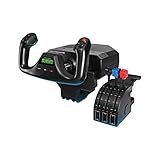
- Realistic yoke controls offer an ideal setup for new pilots and help experienced pilots build muscle memory. In the Box : Flight Yoke with 5.9 ft (1.8m) USB Connector Cable, Flight Throttle Quadrant with 4.92 ft (1.5m), PS/2 Connector Cable, 2 Desk Clamps
- Stainless Steel Yoke Shaft - Robust, smooth and accurate control of your virtual aircraft in flight simulators
- POV Hat, 14 button controls, and 3-position mode switch offer at least 54 programmable controls, giving you most of your aircraft’s functions under your fingertips
- 2 position desk clamp provides mounting flexibility for a wide range of desks with a robust, secure clamping force to ensure your controls stay where you need them

- COMPATIBILITY & CONTROL INTEGRATION: Experience ultimate control in your simulations with the PXN CB1 Button Box – fully programmable buttons and switches put all essential functions at your fingertips. All inputs can be mapped in your simulation software, reducing reliance on a keyboard or in-game menus. Suitable for truck, racing, and farming simulators. Driver-free connection to PC, or connect directly to PXN V9 GEN2, VD Series (VD4, VD6, VD10), and V10 PRO/Ultra racing wheel bases.
- MULTI-TYPE INPUT SYSTEM: Equipped with 19 Buttons across 9 switch types, the CB1 provides up to 30 programmable inputs for engine, lighting, traction, and auxiliary functions. This layout enables precise and flexible configuration across a wide variety of simulation titles. Note: Initial in-game button mapping is required for optimal accuracy.
- FULL SWITCH LAYOUT OVERVIEW: Includes: 2 pushable rotary encoders, 6 momentary buttons, 2 latching buttons, 1 covered toggle switch, 1 engine start button, 1 ESC button, 1 ENTER button, 1 directional joystick, 1 momentary toggle switch, and 3 latching toggle switches.
- ADJUSTABLE RGB BACKLIGHTING: Most buttons feature RGB halo lighting (excluding the joystick). Color and brightness can be modified using the “HANDLE + ABS/TC” key combination. A rear lighting switch provides quick on/off control, allowing you to match your setup’s visual style.

- Universal Compatibility for Switch Family: Tabletop Cabinet-Style Controller Designed specifically to work with Switch, Switch OLED and Switch 2 console
- Plug-and-Play: Simply dock your Switch console to enjoy instant arcade-style gameplay—play while charging or go unplugged when your Switch console has power. Connect to your TV with the included cable for big-screen fun at home or parties
- One-Tap Screenshot & Recording: Easily capture screenshots and record gameplay highlights with the dedicated button during Swtich arcade-style games play
- Smart LED Indicators & Quick Reset: Blue LED stays on when your console is connected; red LED flashes to confirm active Turbo mode. A built-in reset button quickly resolves connection issues
The Ultimate Guide to Simulation Games on Nintendo Switch
Nintendo Switch is a perfect home for simulation games. These games let you build cities, manage farms, or run businesses right from your couch. Because the Switch is portable, you can take your virtual life anywhere. Use this guide to find the perfect simulation game for your library.
Key Features to Look For
When shopping for a simulation game, look for these three things:
- Gameplay Depth: Does the game have enough to do? Good simulation games offer long-term goals and constant upgrades.
- Art Style: Decide if you prefer realistic graphics or cute, stylized visuals.
- Save Systems: Check if the game allows for quick saves. This is vital for handheld gaming.
Understanding Digital vs. Physical Materials
You can buy games in two ways. Physical game cards come in small plastic cases. These are great for collecting or trading with friends. Digital copies are downloaded directly to your Switch. They are very convenient because you do not have to switch cards to play a different game. Just make sure your Switch has enough storage space for digital files.
Factors That Improve or Reduce Quality
Several things change how much you enjoy a game:
- Performance: A smooth frame rate makes managing a farm or city feel responsive. If the game lags, it becomes frustrating.
- User Interface (UI): Simulation games have many menus. A clean, easy-to-read menu system makes the game much more fun.
- Tutorials: A good game teaches you how to play slowly. If the game drops you in without help, you might feel lost.
User Experience and Use Cases
Simulation games are perfect for different lifestyles. If you have a long commute, these games are great because they offer “pick-up-and-play” sessions. If you want to relax after a hard day, slow-paced farming or building games help you unwind. They provide a sense of accomplishment as your virtual world grows over time.
10 Frequently Asked Questions
Q: Are simulation games hard to learn?
A: Most start with a simple tutorial. You will learn the basics before the game gets complex.
Q: Can I play these games without an internet connection?
A: Yes. Most simulation games on Switch are single-player and work perfectly in airplane mode.
Q: Do I need a Pro Controller?
A: The Joy-Cons work fine, but a Pro Controller is more comfortable for long gaming sessions.
Q: Are these games suitable for kids?
A: Many are rated E for Everyone. They are great for teaching planning and resource management.
Q: How much storage do I need?
A: Physical games take almost no space. Digital games vary, so check the file size on the eShop before buying.
Q: Can I pause the game at any time?
A: Almost every simulation game has a pause menu. This is great for busy players.
Q: What is the difference between “Sandbox” and “Story” modes?
A: Sandbox mode lets you build freely without limits. Story mode gives you specific tasks to complete.
Q: Do these games run well in handheld mode?
A: Most games are optimized for the screen. Some text might be small, but the gameplay stays smooth.
Q: Are there multiplayer simulation games?
A: Yes! Some games allow friends to visit your farm or city through local or online play.
Q: Should I buy the DLC?
A: Wait until you finish the base game. If you still want more content, then buy the extra packs.

Hi, I’m Mallory Crusta, the heart and mind behind LovelyPetSpot.com.. As a passionate pet enthusiast, I created this space to share my experiences, expertise, and love for all things pets. Whether it’s helpful tips, heartfelt stories, or advice for pet parents, my mission is to make the journey of caring for your furry, feathery, or scaly friends as joyful and fulfilling as possible. Join me in celebrating the incredible bond we share with our animal companions!