Imagine this: you’ve finally got that super-fast Starlink internet, but your Wi-Fi signal seems to have a mind of its own, dying out in certain rooms or dropping when you need it most. Frustrating, right? You’re not alone. Many Starlink users discover that while their satellite internet is amazing, the reach of their home Wi-Fi can be a real letdown.
That’s where a Wi-Fi booster comes in. But with so many different types and brands out there, picking the best one for your Starlink setup can feel like navigating a maze. You want something that works well, is easy to set up, and won’t break the bank. The good news is, you don’t have to guess anymore.
This post will guide you through what to look for in a Wi-Fi booster for your Starlink. We’ll explain how they work and highlight the features that matter most. By the end, you’ll feel confident choosing a booster that finally gets Starlink speeds to every corner of your home, so you can stream, game, and work without interruption.
Top Wifi Booster For Starlink Recommendations

- 🔌 Advanced Connectivity: Supports both wired (Ethernet) and wireless setup to expand your Starlink mesh network seamlessly.
- 🧩 Easy Integration: Works with your existing Starlink system (excluding Gen 1); ideal for adding extra mesh nodes.
- 🛠️ Versatile Installation: Mount on the wall or place on a table. Includes power supply, mounting stand, screws, and drywall anchors.
- 📶 Optimized Performance: Best placed within two rooms of the main router; avoid obstructions like concrete walls and metal appliances.

- 𝐒𝐭𝐫𝐨𝐧𝐠𝐞𝐫 𝐖𝐢-𝐅𝐢 𝐢𝐧 𝐄𝐯𝐞𝐫𝐲 𝐂𝐨𝐫𝐧𝐞𝐫 - Enjoy extended coverage with strong performance powered by Adaptive Path Selection and simple setup using One-Touch Connection. Perfect for everyday users looking to eliminate dead zones.
- 𝐃𝐮𝐚𝐥-𝐁𝐚𝐧𝐝 𝐖𝐢𝐅𝐢 𝐄𝐱𝐭𝐞𝐧𝐝𝐞𝐫 𝐰𝐢𝐭𝐡 𝟏.𝟐 𝐆𝐛𝐩𝐬 𝐓𝐨𝐭𝐚𝐥 𝐁𝐚𝐧𝐝𝐰𝐢𝐝𝐭𝐡 - Extend your home network with full speeds of 867 Mbps (5 GHz) and 300 Mbps (2.4 GHz).
- 𝐌𝐚𝐱𝐢𝐦𝐢𝐳𝐞𝐝 𝐂𝐨𝐯𝐞𝐫𝐚𝐠𝐞 𝐮𝐩 𝐭𝐨 𝟏𝟓𝟎𝟎 𝐒𝐪. 𝐅𝐭 - Two adjustable external antennas provide reliable connections for eliminating dead zones for up to 32 devices. Actual performance vary by conditions, distance to devices, and obstacles such as walls.
- 𝐎𝐮𝐫 𝐂𝐲𝐛𝐞𝐫𝐬𝐞𝐜𝐮𝐫𝐢𝐭𝐲 𝐂𝐨𝐦𝐦𝐢𝐭𝐦𝐞𝐧𝐭 - TP-Link is a signatory of the U.S. Cybersecurity and Infrastructure Security Agency’s (CISA) Secure-by-Design pledge. This device is designed, built, and maintained, with advanced security as a core requirement.

- UP TO 15000 SQ.FT, NO MORE DEAD ZONES: Baetaey wifi extenders designed to bring you wider coverage of signals, eliminate wifi dead zones and offer available and steady network, extending your wireless network to every corner of your house. No more network lag!
- JUST PRESS AND THE SETUP DONE: 1-Click setup. All you need to do is press the WPS button on your router and the WPS button on our internert extender. Single-Tap WPS connects your device within 30 seconds
- 4 MODES MEET YOUR VARIOUS NEEDS: The internet booster support Repeater, Bridge, Access Point and Router 4 Modes. Whether you are working online, studying online or simply streaming, this 4-mode wifi repeater gets it done and can connect up to 70+ devices. Offering you strong and stable connection with devices such as laptops, smartphones, speakers, IP cameras, tablets, Fire Stick, and more
- BANK LEVEL FINANCIAL SECURITY, REJECT INFOMATION LEAKAGE: The wifi booster and signal amplifier is compatible with all standard Wi-Fi routers, gateways, and access points. This powerful 300MPBS is paired with our 2.4GH processor for fantastic performance and supports WEP and WPA/WPA2 wireless security protocols to protect your personal data

- 【𝐀𝐛𝐨𝐮𝐭 𝐀𝐟𝐭𝐞𝐫 𝐬𝐚𝐥𝐞𝐬】𝐏𝐥𝐞𝐚𝐬𝐞 𝐜𝐨𝐧𝐭𝐚𝐜𝐭 𝐮𝐬 𝐢𝐟 𝐲𝐨𝐮 𝐡𝐚𝐯𝐞 𝐚𝐧𝐲 𝐪𝐮𝐞𝐬𝐭𝐢𝐨𝐧𝐬 𝐨𝐫 𝐧𝐞𝐞𝐝 𝐚𝐬𝐬𝐢𝐬𝐭𝐚𝐧𝐜𝐞. 𝐏𝐡𝐨𝐧𝐞 𝐬𝐮𝐩𝐩𝐨𝐫𝐭: +𝟏 (𝟖𝟖𝟖) 𝟗𝟕𝟑-𝟎𝟖𝟖𝟑 (𝐌𝐨𝐧–𝐅𝐫𝐢, 𝟗:𝟎𝟎 𝐀𝐌–𝟔:𝟎𝟎 𝐏𝐌, 𝐔𝐓𝐂-𝟓). 𝐄𝐦𝐚𝐢𝐥 𝐬𝐮𝐩𝐩𝐨𝐫𝐭: 𝐂𝐨𝐧𝐭𝐚𝐜𝐭@𝐰𝐚𝐯𝐥𝐢𝐧𝐤.𝐜𝐨𝐦. 𝐀𝐦𝐚𝐳𝐨𝐧 𝐌𝐞𝐬𝐬𝐚𝐠𝐞: 𝐂𝐨𝐧𝐭𝐚𝐜𝐭 𝐮𝐬 𝐝𝐢𝐫𝐞𝐜𝐭𝐥𝐲 𝐢𝐧 𝐀𝐦𝐚𝐳𝐨𝐧. 𝐖𝐞 𝐰𝐢𝐥𝐥 𝐩𝐫𝐨𝐯𝐢𝐝𝐞 𝐬𝐨𝐥𝐮𝐭𝐢𝐨𝐧𝐬 𝐰𝐢𝐭𝐡𝐢𝐧 𝟖𝐡, 𝐥𝐢𝐟𝐞-𝐥𝐨𝐧𝐠 𝐟𝐫𝐞𝐞 𝐭𝐞𝐜𝐡𝐧𝐢𝐜𝐚𝐥 𝐬𝐮𝐩𝐩𝐨𝐫𝐭. 𝐖𝐞 𝐎𝐟𝐟𝐞𝐫 𝟐 𝐘𝐞𝐚𝐫𝐬 𝐖𝐚𝐫𝐫𝐚𝐧𝐭𝐲, 𝐖𝐢𝐭𝐡𝐢𝐧 𝐓𝐡𝐚𝐭 𝐓𝐢𝐦𝐞, 𝐖𝐞 𝐖𝐢𝐥𝐥 𝐒𝐞𝐧𝐝 𝐀 𝐍𝐞𝐰 𝐎𝐧𝐞 𝐅𝐫𝐞𝐞 𝐅𝐨𝐫 𝐀𝐧𝐲 𝐈𝐬𝐬𝐮𝐞𝐬.
- 【WiFi Dead Zones? Not Anymore — Long-Range WiFi Coverage for Outdoor Spaces】Extend your home network beyond walls with WAVLINK Outdoor WiFi 6 Extender. Equipped with four high-gain 8dBi omni-directional detachable fiberglass antennas, it provides up to 200-300m (radius) WiFi coverage in line-of-sight environments, delivering a stable signal for up to 256 devices. Ideal for single-family homes, large yards, farms, estates, garages, RV parking areas, and other open outdoor environments where indoor routers cannot reach.
- 【Blazing-Fast WIFI 6 AX1800 & Starlink Compatible】Enjoy Ultra-Fast Dual Band WiFi 6 speeds up to 1800 Mbps (1201 Mbps on 5GHz + 574 Mbps on 2.4GHz) for smooth 4K video streaming, outdoor security cameras , online gaming and more. Seamlessly connects with Starlink Gen 2/3 (via Starlink Ethernet Adapter), making it a perfect long-range internet extension for remote homes, rural properties, and off-grid setups.
- 【Built Tough with IP67 Weatherproof Rating】Designed to thrive in harsh conditions, this outdoor access point features a fully sealed, heat-resistant IP67 casing. It operates reliably in temperatures from -20°C to 50°C and resists moisture, dust, lightning (6KV), and static shock (15KV). Trust it to keep connected through rain, heat, or snow.

- 🔌 Advanced Connectivity: Supports both wired (Ethernet) and wireless setup to expand your Starlink mesh network seamlessly.
- 🧩 Easy Integration: Works with your existing Starlink system (excluding Gen 1); ideal for adding extra mesh nodes.
- 🛠️ Versatile Installation: Mount on the wall or place on a table. Includes power supply, mounting stand, screws, and drywall anchors.
- 📶 Optimized Performance: Best placed within two rooms of the main router; avoid obstructions like concrete walls and metal appliances.

- 【Extend WiFi 360° Full Coverage】The WiFi Extender to bring you wide coverage of signals,Coverage up to 5000Sq. ft, reaching every corner of your home. Whether you're in the bedroom, navigating between floors, in the restroom, working in the garage, utilizing the basement, or enjoying the outdoors in your garden, our WiFi extenders guarantee a stable connection, enabling you to stream, work, and connect without interruption.
- 【WiFi Extenders Signal Booster for Home】 : internet extender wifi booster with lastest dual band technology can provide up to 300Mbps for 2.4GHz, up to 867Mbps for 5Ghz, a total rate of about 1200Mbps, maximizing reduces the loss of data transmission and enjoying HD video/game and fast speeds internet mode.
- 【Repeater / AP Mode & Ethernet Port】Instantly Switch 3 Modes - Repeater/AP Mode to meet your different need in kinds of environment. The Ethernet ports is able to wired network be expanded into a wireless network and connect to any wired ethernet devices such as smart TV.
- 【Universal Compatibility & Easy set up】 : Connect via WPS button, or join "WiFi-pro_xxxx" on your phone and visit 192.168.11.1. Two tips that prevent 90% of setup failures: (1) turn off mobile data on your phone before setup; (2) if you see a password error or can't connect, hold the reset button for 10 seconds to restore factory settings and start fresh.
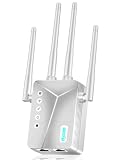
- Say Goodbye to Dead Zones, Not Your Connection: Stop losing WiFi in bedrooms, garages, or basements. Hyzom WiFi extender signal booster., pushing strong signals through walls and hard-to-reach spaces—so you can stream, browse, and stay connected anywhere
- Smooth Streaming & Crisp Calls Without the Frustration: No more buffering, frozen Zoom, or gaming lag. Powered by a Bionic Chip and 4 high-gain antennas, this WiFi booster delivers stable performance for 4K video and crystal-clear calls throughout your home
- From Box to Better WiFi in Minutes: No tech skills needed. Press WPS for quick setup or use your browser for guided installation. Works with all standard routers—upgrade your network without replacing existing equipment
- Support Your Whole Connected Home: Streaming, working, studying, or smart security—this internet booster handles 65+ devices with ease. The built-in Ethernet port gives PCs, consoles, or TVs a fast wired connection whenever you need it

- 【About After Sales】: Please feel free to contact us if you have any question. Phone support: +18889730883 ( UTC-5 ) Mon -Fri 9AM -6PM. Email support: Contact@wavlink.com. Or contact us via Amazon. We will provide solutions within 8 h, life-long technical support.
- 【Enjoy True AX3000 WiFi 6 Speed】The next generation of WiFi, complies with IEEE 802.11 ac/a/b/g/n standards. Supports dual-band maximum speed up to 5GHz 2402Mbps and 2.4GHz 573Mbps, avoiding wireless interference & congestion and offering lightning-fast Internet speed. Support work with starlink/ router/ moden/ wifi extender.
- 【Long Range WiFi Coverage】The upgraded 4x 8dBi omni-directional detachable fiberglass antennas and two built-in amplifiers provide up to 200-300m (radius) WiFi coverage and up to 256 connections. Equipped with gigabit ethernet port that supports 1000/100/10Mbps network.
- 【Indoor/Outdoor Use】Equipped with IP67 waterproof enclosure, 15kV ESD protection and 6kV lightning protection, it can work normally in rain/snow/wind/thunder and other bad weather. Environment : Operating Temperature: -20–50 ℃ (-4–122 ℉), Storage Temperature: -30–70 ℃ (-22–158 ℉), Operating Humidity: 10–90% RH non-condensing, Storage Humidity: 10–90% RH non-condensing.
Boost Your Starlink: The Ultimate Buying Guide for WiFi Boosters
Are you tired of slow internet speeds or dead zones in your home, even with Starlink? A WiFi booster can be your internet’s best friend! This guide will help you choose the right one to get the most out of your Starlink service.
What to Look For in a WiFi Booster for Starlink
When you’re shopping for a WiFi booster, keep these important features in mind.
Key Features to Look For
- Speed and Bandwidth: Look for boosters that support the latest WiFi standards, like WiFi 6 (802.11ax). This means your internet will be faster and can handle more devices at once. Faster speeds mean smoother streaming and quicker downloads.
- Range and Coverage: A good booster extends your WiFi signal to all corners of your home. Think about how big your house is and where you need the strongest signal. Some boosters cover a small area, while others can blanket a large house.
- Ease of Setup: You want a booster that’s easy to plug in and set up. Many come with simple apps that guide you through the process. No one wants to spend hours fiddling with technology.
- Number of Devices: If you have many gadgets connected to your WiFi (phones, tablets, smart TVs, game consoles), make sure the booster can handle them all without slowing down.
- Security Features: Look for boosters that offer strong security, like WPA3 encryption. This keeps your network safe from unwanted visitors.
Important Materials and Design
While you won’t be handling the internal components much, the design and build quality matter.
- Antennas: Some boosters have external antennas. These can often be adjusted to point towards areas that need a stronger signal. They can help focus the WiFi signal.
- Build Quality: A well-built booster will last longer. It should feel sturdy and not flimsy.
- Power Source: Most boosters plug directly into a wall outlet. Make sure the plug fits your country’s outlets.
Factors That Affect WiFi Booster Quality
Not all WiFi boosters are created equal. Here’s what makes a difference.
Factors That Improve Quality
- Dual-Band or Tri-Band Technology: These boosters broadcast on multiple WiFi frequencies (2.4GHz and 5GHz, or even 6GHz). This helps reduce network traffic and speeds things up.
- Mesh Technology: Mesh WiFi systems use multiple units that work together to create one seamless network. They are great for large homes and offer excellent coverage.
- MU-MIMO (Multi-User, Multiple-Input, Multiple-Output): This technology allows the booster to talk to multiple devices at the same time. It’s like having multiple lanes on a highway for your internet data.
- Beamforming: This feature directs the WiFi signal towards your devices, giving them a stronger connection.
Factors That Can Reduce Quality
- Placement: Putting your booster in a bad spot is a common mistake. Walls, large appliances, and even fish tanks can block or weaken the WiFi signal.
- Outdated Standards: Boosters that use older WiFi standards (like WiFi 4 or 5) won’t be as fast or efficient as newer ones.
- Interference: Other electronic devices, like microwaves or Bluetooth speakers, can interfere with your WiFi signal.
- Overloaded Network: Trying to connect too many devices to a weak booster will slow everything down.
User Experience and Use Cases
Think about how you’ll use your WiFi booster. This helps you pick the best one for your needs.
User Experience
Most modern WiFi boosters are designed for easy use. Many have simple mobile apps. You can often set them up in just a few minutes. The app might let you check your signal strength or prioritize certain devices. A good booster makes your internet work better without you having to think about it.
Use Cases
- Large Homes: If your Starlink signal is weak in certain rooms, a booster can fill those gaps.
- Multi-Story Houses: WiFi signals can struggle to travel between floors. A booster can help bring strong internet upstairs or downstairs.
- Homes with Many Devices: If your family has lots of phones, tablets, and smart devices, a booster ensures everyone gets a good connection.
- Outdoor Areas: Some boosters can even extend your WiFi signal to patios, decks, or garages.
Frequently Asked Questions about WiFi Boosters for Starlink
Here are some common questions people have about WiFi boosters.
Q1: Will a WiFi booster work with Starlink?
A: Yes, most WiFi boosters work with any internet service, including Starlink. They boost the WiFi signal that comes from your Starlink router.
Q2: Do I need a special WiFi booster for Starlink?
A: No, you don’t need a special one. Any good quality WiFi booster designed for home use will work. Just make sure it supports fast speeds.
Q3: How do I set up a WiFi booster?
A: Setup is usually easy. You plug the booster into an outlet near your Starlink router. Then, you connect it to your Starlink WiFi using a smartphone app or a web browser. The instructions are often very clear.
Q4: Where should I place my WiFi booster?
A: Place the booster halfway between your Starlink router and the area where you have a weak signal. Don’t put it too close to the router or too far away. Also, avoid placing it near thick walls or large metal objects.
Q5: How much does a good WiFi booster cost?
A: Prices vary. Simple plug-in boosters might cost $30-$60. More advanced mesh systems can cost $100-$300 or more.
Q6: Can a WiFi booster make my internet faster than Starlink provides?
A: A booster cannot make your internet faster than your Starlink service itself. It helps your WiFi signal reach further and more reliably within your home.
Q7: What’s the difference between a WiFi extender and a WiFi booster?
A: The terms are often used interchangeably. A booster typically rebroadcasts the WiFi signal, while an extender creates a new network. Mesh systems are a more advanced type of extender that creates a single, strong network.
Q8: How many WiFi boosters do I need?
A: For most homes, one booster is enough. If you have a very large house or multiple floors with dead spots, you might need two, or a mesh system.
Q9: Will a WiFi booster help if my Starlink dish is far from my house?
A: A WiFi booster helps with your WiFi signal inside your house. It doesn’t affect the signal from your Starlink dish to the satellite.
Q10: Are mesh WiFi systems better than single boosters?
A: For larger homes or homes with many floors, mesh systems are often better. They provide a more seamless and consistent WiFi experience throughout the entire house.

Hi, I’m Mallory Crusta, the heart and mind behind LovelyPetSpot.com.. As a passionate pet enthusiast, I created this space to share my experiences, expertise, and love for all things pets. Whether it’s helpful tips, heartfelt stories, or advice for pet parents, my mission is to make the journey of caring for your furry, feathery, or scaly friends as joyful and fulfilling as possible. Join me in celebrating the incredible bond we share with our animal companions!