As an Amazon Associate I earn from qualifying purchases.
Old negatives, slides, and printed photos are easy to leave in storage, where they take up space and remain difficult to share. A Neg Scanner can turn those analogue memories into digital files, but the right choice depends on what you need to scan.
Consider the film formats supported, whether you need a computer, and how much control you want over image quality. A built-in screen or phone app can simplify casual scanning, while a high-resolution flatbed suits more demanding photo work.
These picks were selected from the listed features, with priority given to scanners that handle negatives or slides and offer clearly different workflows. The selection includes standalone units, phone-based tools, a touchscreen model, and a high-end photo scanner.
This guide covers the main strengths and trade-offs of each option, followed by practical buying advice to help you match a film scanner to your collection and budget.
Our Top 5 Neg Scanner Picks at a Glance
| Product | ||
|---|---|---|
 |
DigitPro Photo, Slide & Negative Scanner Computer-free home archiving |
Check Price |
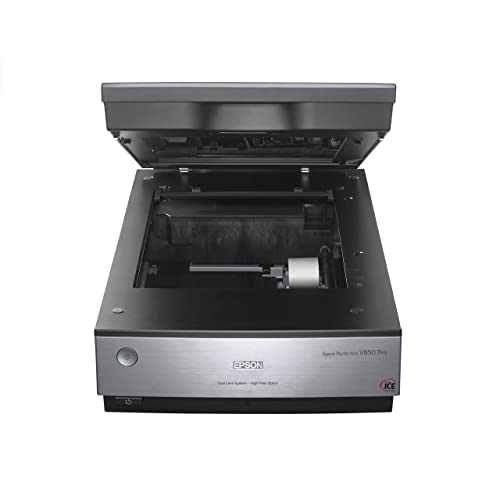 |
Epson Perfection V850 Pro Photo Scanner High-detail photo work |
Check Price |
 |
HP Film & Slide Scanner HPFS700 Touchscreen film conversion |
Check Price |
 |
DigitPro Mobile 35mm Film & Slide Scanner Portable 35mm scanning |
Check Price |
 |
TCNEWCL 35mm Negative Slide Scanner Low-space phone scanning |
Check Price |
Top 5 Neg Scanner Options: Detailed Reviews
1. DigitPro Photo, Slide & Negative Scanner
The DigitPro Photo, Slide & Negative Scanner is a Neg Scanner for home archiving when you want a simple setup without a computer. Its 5-inch HD screen gives you a larger preview while converting 35mm and 110 negatives, slides, and physical photos into 22MP digital images. One-touch controls and standalone operation remove the need for software, apps, or drivers. Scans save directly to the included 8GB SD card, while the bundled holders, photo trays, and cleaning brush help you start immediately. The three-year warranty adds useful reassurance for regular household use.
What We Like:
- The 5-inch screen makes previews easier to see than a small built-in display.
- Standalone operation lets you scan without connecting a computer or installing software.
- It handles 35mm and 110 negatives, slides, and physical photos in one device.
- One-touch controls keep the archiving process straightforward for casual users.
- The bundle includes holders, trays, an 8GB SD card, and a cleaning brush.
What Could Be Improved:
- The included 8GB SD card may fill quickly if you digitize a large collection.
- You still need another device to transfer, organize, or back up the saved images.
- Its focus on simple home conversion may not suit users seeking advanced scanning controls or a specialist photo-workflow setup.
Buy it if you want to rescue family photos, slides, and common film formats with minimal setup and no computer nearby. The large screen and included accessories make it approachable for home projects. Skip it if you need extensive image-control options, high-volume storage, or a more advanced workflow for critical photo work.
2. Epson Perfection V850 Pro Photo Scanner
The Epson Perfection V850 Pro is a Neg Scanner built for detailed photo work rather than quick, casual digitising. Its 6400 dpi resolution preserves fine image detail, while the 4.0 Dmax rating helps capture smoother tonal gradations and shadow information. The dual-lens system selects the more suitable lens for the material, supporting consistent results across different scanning tasks. Digital ICE is also included in the product name. It supports Windows versions from XP through 8.1 and Mac OS X 10.6 through 10.10, so check your computer before buying.
What We Like:
- 6400 dpi gives you plenty of resolution for detailed photo scans.
- The 4.0 Dmax rating supports smoother gradations and better shadow detail.
- The dual-lens system chooses between two lenses for optimum results.
- It suits careful, high-detail photo archiving rather than rushed conversions.
- Windows and Mac OS X compatibility covers a broad range of older systems.
What Could Be Improved:
- Its high-detail, pro-oriented design may be excessive for occasional snapshot scanning.
- The listed operating-system support is dated, so newer computer users should verify compatibility first.
- It is less suited to people who want a simple, portable scanning setup.
Buy this Epson if you want a Neg Scanner for high-detail photo work and value resolution, tonal range, and lens flexibility. It makes most sense for careful home archiving or demanding image work. Skip it if you only need occasional basic scans, a compact portable device, or confirmed support for a newer operating system.
3. HP Film & Slide Scanner HPFS700
The HP FilmScan HPFS700 is a Neg Scanner designed for straightforward film conversion without a computer. Its 7-inch color touchscreen lets you preview scans, crop them, and adjust size, color, and brightness on the device. A 13-megapixel color CMOS sensor handles color and black-and-white originals, while the quick-feed tray and 50mm adapter support 135, 126, and 110 film. You can transfer scans by USB, show them on a TV through HDMI, or use gallery mode to display them as a digital picture frame.
What We Like:
- The touchscreen makes previewing and basic corrections convenient.
- On-device editing means you do not need additional software for simple adjustments.
- The quick-feed tray suits larger film collections and supports three formats.
- USB and HDMI give you practical ways to move or view scans.
- Its computer-free design should be approachable for occasional users.
What Could Be Improved:
- The listed film support covers 135, 126, and 110 formats, so it is not a universal film scanner.
- The 13-megapixel sensor may be less suitable for demanding users who need the finest detail for extensive enlargement or archival work.
- A touchscreen and built-in editing controls are convenient, but they offer less flexibility than dedicated computer-based scanning software.
Buy this if you want an accessible home film converter with a large touchscreen, quick-feed tray, and simple USB or HDMI sharing. It suits mixed collections of 135, 126, and 110 film. Skip it if you need broad format support, advanced software controls, or the most detailed scans for professional printing.
4. DigitPro Mobile 35mm Film & Slide Scanner
The DigitPro Mobile 35mm Film and Slide Scanner is a foldable, phone-based Neg Scanner for turning 35mm black-and-white or colour negatives, positives, and slides into digital images. Its built-in LED backlight illuminates the film while the holder keeps your smartphone in position, so you can scan without a computer. A built-in battery supports portable use, and the compact design folds for storage or travel. The free app adds colour and contrast adjustments with no subscription, while the illustrated guide makes setup approachable for first-time users.
What We Like:
- The foldable design is easy to store and carry.
- You can scan 35mm film without connecting to a computer.
- The built-in battery suits scanning in different locations.
- The free app includes colour and contrast adjustments without subscriptions.
- The illustrated manual helps beginners set up the scanner.
What Could Be Improved:
- You need a smartphone camera to capture the digitised frame.
- It supports 35mm formats, so it is not suitable for larger film.
- Final image results will depend partly on your smartphone camera and positioning.
Buy it if you want a compact, beginner-friendly way to digitise 35mm negatives and slides using a phone, especially for occasional home archiving or travel. Skip it if you need broader film-format support, computer-independent image capture, or a dedicated scanner workflow.
5. TCNEWCL 35mm Negative Slide Scanner
The TCNEWCL 35mm Negative Slide Scanner is a simple Neg Scanner for converting 35mm slides and film negatives with your smartphone. Insert the film into the shell, switch on the built-in LED backlight, position your phone’s lens over the opening, and capture an image. Its foldable body reduces to a small box for storage or travel. A free scanning app, with Snapseed recommended, lets you crop, rotate, filter, adjust colour and contrast, then share your images.
What We Like:
- It handles both 35mm slides and film negatives.
- The foldable design takes up little storage space.
- A built-in LED backlight makes the capture process straightforward.
- You can edit and share scans through a free app.
- It works with a smartphone rather than requiring a dedicated computer.
What Could Be Improved:
- Image quality is limited by the smartphone and this scanner’s simple setup.
- You need to use your own smartphone to capture the images.
- The app workflow adds an extra step compared with a dedicated scanner.
Buy it if you want an inexpensive, compact way to view and save a modest collection of 35mm slides or negatives using a phone. It suits travel and occasional home use. Skip it if you need highly detailed archival scans or prefer a fully automated, computer-free scanner.
How To Choose The Right Negative Scanner
The right Neg Scanner depends less on headline features than on the material you need to preserve, the space you have available, and how much editing you expect to do afterward. Before choosing, decide whether you want a simple way to save family memories or a more controlled setup for careful photo work.
Choose for your original formats
Start by checking whether you need to scan negatives, mounted slides, prints, or a mixture of all three. Some devices focus on 35mm film, while others are better suited to broader home archiving. If your collection includes several formats, confirm that the scanner supports each one before you buy.
Also consider the condition and size of your originals. Loose strips, mounted slides, and printed photographs may require different holders or handling methods. A scanner that suits one type of media may be awkward for another, so match its intended use to your actual collection.
Decide how much control you need
For casual archiving, a straightforward workflow can matter more than extensive settings. You may prefer a device that saves files with minimal computer involvement, especially if your priority is preserving a large number of memories rather than refining every frame.
More demanding photo work benefits from greater control over scanning and file preparation. If you plan to crop, correct colour, or make larger prints, look for a workflow that fits your computer setup and gives you room to adjust the results later.
Check the workflow before buying
Think about where the scanned files will go. Computer-free models can simplify storage and sharing, while computer-connected designs may fit better if you already organise photos with desktop software. Phone-based scanning can be convenient, but it may depend more heavily on your phone and the surrounding setup.
Review how you will move, name, and back up files. A quick scan is useful only if you can find the images later. For a large archive, a repeatable process matters: scan in batches, use consistent filenames, and keep a second copy of important files.
Balance space, speed, and image goals
Measure your available workspace if you plan to leave the scanner set up. A compact unit is easier to store and carry, whereas a larger photo-focused device may make more sense if you have a permanent desk and a substantial archive.
Finally, set a realistic standard for the finished files. Prioritise convenience for everyday family snapshots, but give detail and editing flexibility more weight when the originals are valuable or you intend to print them. The best purchase is the one whose workflow you will actually use consistently.
Which Neg Scanner Fits Your Collection?
The DigitPro Photo, Slide & Negative Scanner is the best overall pick for straightforward home archiving because its computer-free workflow keeps the process simple. Choose the Epson Perfection V850 Pro if your priority is high-detail photo work and you want a more involved setup. The HP touchscreen model suits easy film conversion, while the DigitPro Mobile and TCNEWCL options make more sense when portability or limited storage space matters most.

Hi, I’m Mallory Crusta, the heart and mind behind LovelyPetSpot.com.. As a passionate pet enthusiast, I created this space to share my experiences, expertise, and love for all things pets. Whether it’s helpful tips, heartfelt stories, or advice for pet parents, my mission is to make the journey of caring for your furry, feathery, or scaly friends as joyful and fulfilling as possible. Join me in celebrating the incredible bond we share with our animal companions!