As an Amazon Associate I earn from qualifying purchases.
Choosing among Thermal Printers For Small Business can be difficult when you need reliable shipping labels without adding complexity to your workspace. The right model should match how you print, where you print, and which label sizes your business uses.
Connectivity matters if you switch between a phone, laptop, and desktop computer. Label-width support, setup, template tools, print clarity, and the printer’s physical footprint can also make a meaningful difference in daily use.
These five picks were selected from the supplied products based on their stated features, with priority given to distinct business needs rather than colour or size variations. The list includes options for high-volume output, mixed-size labels, mobile printing, custom designs, and compact shipping stations.
Use the quick comparison first, then read the individual angles and buying guidance to identify the best fit for your workflow.
Our Top 5 Thermal Printers For Small Business Picks at a Glance
| Product | ||
|---|---|---|
 |
MUNBYN RealWriter Bluetooth Label Printer High-volume, clear labels |
Check Price |
 |
Phomemo 241BT Bluetooth Label Printer Mixed-size label printing |
Check Price |
 |
NULLTONEX Bluetooth Shipping Label Printer Mobile and template-heavy use |
Check Price |
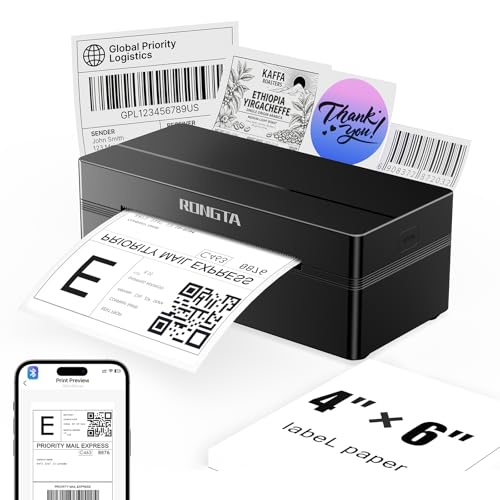 |
Rongta RP425 Bluetooth Label Printer Compact shipping stations |
Check Price |
 |
Nelko Bluetooth Shipping Label Printer Simple platform flexibility |
Check Price |
Top Picks: Detailed Reviews
1. MUNBYN RealWriter Bluetooth Label Printer
Thermal Printers For Small Business need to handle varied labels without slowing your packing routine, and the MUNBYN Bluetooth Thermal Label Printer is built for that job. It supports labels from 1.57 to 4.25 inches wide, covering shipping, returns and inventory needs. Its stated lifespan reaches up to 970,000 labels, while the 4-inch DAC chip auto-calibrates to reduce misalignment. Output remains sharply readable with 0.1 mm font legibility. Bluetooth support works with Android, iPhone and Windows devices, and its 60 dB operation should suit shared workspaces.
What We Like:
- The stated 970,000-label lifespan is the longest-lasting claim in this selection.
- The 1.57-to-4.25-inch width range supports more than standard shipping labels.
- DAC auto-calibration helps reduce label misalignment during repeated printing.
- 0.1 mm font legibility keeps small text crisp on monochrome labels.
- Bluetooth connectivity supports Android, iPhone and Windows workflows.
What Could Be Improved:
- The printer produces monochrome labels, so it is not suitable for colour-coded packaging or promotional labels.
- Its 60 dB operating noise is relatively quiet, but it is not silent.
- The broad label-width range may be unnecessary if you only print standard 4×6 shipping labels.
Buy it if you run a busy small-business packing station, need several label widths, or value the stated long lifespan and automatic calibration. Skip it if you need colour output, completely silent operation, or only print occasional standard shipping labels and have no use for its added flexibility.
2. Phomemo 241BT Bluetooth Label Printer
Thermal Printers For Small Business buyers get a flexible option in the Phomemo 241BT. It handles label widths from 1 to 4.6 inches, so you can print shipping labels alongside smaller formats, and the package includes 20 labels to get started. Bluetooth printing works with iOS and Android through the Labelife app, while USB connects the printer to Windows, Mac OS, Chrome OS and Linux computers. Direct thermal printing avoids ink and toner, and the stated 150 mm/s speed suits regular home or small-business dispatch work.
What We Like:
- It supports mixed-size labels from 1 to 4.6 inches.
- The included 20 labels let you begin printing immediately.
- Bluetooth printing works with iOS and Android devices through Labelife.
- USB support covers Windows, Mac OS, Chrome OS and Linux.
- Direct thermal printing removes the need for ink or toner.
What Could Be Improved:
- Phone and tablet printing requires downloading and using the Labelife app.
- Chrome OS users must add the Labelife extension through the Chrome web store.
- The included label quantity is useful for setup but limited for sustained shipping volume.
Buy the Phomemo 241BT if you need one printer for different label sizes and want both mobile Bluetooth and desktop USB printing. It fits home sellers and small shipping operations well. Skip it if you want a printer that works without an app or if 20 starter labels will not cover your initial workload.
3. NULLTONEX Bluetooth Shipping Label Printer
The NULLTONEX is a compact 4×6 direct-thermal shipping printer aimed at small-business mailing desks, with Bluetooth and USB connections for phones, laptops, and PCs. Direct thermal printing means you avoid ink and toner, while the free app gives you 1,800+ customizable templates, 300+ fonts, and editing tools for shipping labels, waybills, and organization. It supports Amazon, Shopify, Etsy, USPS, UPS, FedEx, and DHL, plus standard labels. Its matte, reinforced finish and printhead overheat protection add practical durability. Among Thermal Printers For Small Business, its strongest angle is flexible, template-heavy mobile use.
What We Like:
- Bluetooth and USB provide flexible connections across phones, laptops, and PCs.
- The app’s 1,800+ templates and 300+ fonts support detailed customization.
- Direct thermal printing removes ink and toner from the supply list.
- Compatibility covers major carriers and e-commerce platforms, including Amazon and Shopify.
- The compact design fits neatly on a desk, while overheat protection supports stable use.
What Could Be Improved:
- Bluetooth printing requires downloading the dedicated app, adding a setup step for phone users.
- The extensive templates and font options may feel unnecessary if you only print basic shipping labels.
- Its strongest features suit customization-heavy workflows, so simple shipping setups may not use its full potential.
Buy it if you ship through major marketplaces or carriers and want one compact printer that works with mobile devices as well as computers. The template library suits sellers who create varied labels or organization prints. Skip it if you want a bare-bones workflow and have no use for Bluetooth, customization, or the dedicated app.
4. Rongta RP425 Bluetooth Label Printer
The Rongta RP425 is one of the more practical Thermal Printers For Small Business shipping stations, especially when desk space is limited. Its compact 10.2 x 7.4 x 5.3-inch design fits on a desk or in a drawer, while Bluetooth support lets you print from iOS and Android phones and tablets through the RONGTA app. Automatic label identification detects, grabs, and feeds labels without manual adjustment. Windows and Mac drivers support straightforward setup, and printing reaches up to 150 mm/s at 203 dpi.
What We Like:
- The compact build suits small desks and packing areas.
- Automatic label feeding reduces setup fiddling between label rolls.
- Bluetooth support allows printing from compatible phones and tablets.
- Windows and Mac compatibility gives you flexible installation options.
- Printing speeds of up to 150 mm/s support busy shipping workflows.
What Could Be Improved:
- The printer depends on the RONGTA app for mobile printing, adding another setup step.
- Its 203 dpi resolution is practical for shipping labels but may not suit highly detailed graphics.
- The listed dimensions are compact for a printer, but it still needs room for label handling and access.
Buy the Rongta RP425 if you run a compact shipping station and want automatic label handling, mobile connectivity, and support for Windows or Mac. Skip it if you need exceptionally detailed graphics, dislike app-based setup, or require a printer with a smaller footprint than its 10.2-inch width.
5. Nelko Bluetooth Shipping Label Printer
For Thermal Printers For Small Business, the Nelko Bluetooth Shipping Label Printer offers a practical balance of wireless convenience and desktop flexibility. You can print from iOS and Android through the NELKO app, while Windows 7 and later, Mac, and Chrome OS support USB connections. Its 150 mm/s print speed can produce up to 72 4×6 labels per minute, helping you process orders efficiently. Support for Amazon, eBay, Shopify, USPS, UPS, PayPal, Poshmark, and other platforms makes it suitable for varied selling workflows.
What We Like:
- Bluetooth printing works with iOS and Android through the NELKO app.
- USB connectivity supports Windows, Mac, and Chrome OS.
- The stated speed reaches up to 72 4×6 labels per minute.
- Compatibility with major marketplaces and shipping services adds flexibility.
- Driver and troubleshooting videos are included on the supplied U-Disk.
What Could Be Improved:
- Mac users must use USB because Bluetooth printing is not supported on Mac OS.
- Wireless printing requires downloading and using the NELKO app.
- You may need to consult the included setup and troubleshooting materials before printing.
Buy this Nelko if you want a straightforward 4×6 label printer with both Bluetooth and USB, especially for selling across several marketplaces. It suits home businesses and commercial shipping desks that value quick setup and crisp output. Skip it if you need Mac Bluetooth printing or prefer a printer with no companion app.
How To Choose The Right Thermal Label Printer
Choosing among Thermal Printers For Small Business use starts with your shipping routine, not the printer’s feature list. Estimate how many labels you print in a typical day, which label sizes you need, and whether you work mainly from a computer, phone, or tablet. The right fit should reduce interruptions rather than add another complicated step to fulfillment.
Match the printer to your label workload
Consider both your normal volume and your busiest periods. A printer intended for occasional orders may feel limiting if you regularly prepare large batches, while an oversized setup can take up valuable room at a small packing station. Look for clear information about the manufacturer’s intended workload and choose a model that leaves some headroom for growth.
Check label-size and format flexibility
Shipping operations do not always use one label format. You may need standard carrier labels, smaller product or address labels, or different templates for invoices and storage bins. Confirm that the printer supports the dimensions and label types you actually use, and check whether changing between sizes is straightforward enough for your workflow.
Choose connectivity for the way you work
Bluetooth can be useful if you print from mobile devices or want to position the printer away from your main computer. A computer-focused setup may be more suitable if orders are processed at a fixed desk. Before buying, verify compatibility with your operating systems, phones, tablets, shipping services, marketplaces, and label-design software rather than assuming every Bluetooth printer works with every platform.
Consider setup, templates, and ongoing usability
Review how labels are created and whether the available app or software supports the templates you need. Template-heavy workflows benefit from a broad selection of layouts and easy editing, while a simple operation may be better served by fewer menus and a quicker path from order to print. Also check the included instructions, replacement-supply availability, and how easily you can reach support if setup becomes difficult.
Finally, compare the complete ownership experience rather than focusing only on the printer. Factor in compatible labels, the space available beside your packing materials, and whether more than one person needs to operate it. A compact model can suit a small shipping station, while a higher-volume choice may make more sense if avoiding repeated print batches is your priority.
Which Small-Business Label Printer Fits You?
The MUNBYN RealWriter Bluetooth Label Printer is the best overall pick for a small business handling high volumes and needing clear labels. The Phomemo 241BT is the best alternative if your workflow uses mixed-size labels and needs more flexibility. Choose the MUNBYN for a focused, busy shipping operation; choose the Phomemo when changing label formats matters more than keeping the setup narrowly focused.

Hi, I’m Mallory Crusta, the heart and mind behind LovelyPetSpot.com.. As a passionate pet enthusiast, I created this space to share my experiences, expertise, and love for all things pets. Whether it’s helpful tips, heartfelt stories, or advice for pet parents, my mission is to make the journey of caring for your furry, feathery, or scaly friends as joyful and fulfilling as possible. Join me in celebrating the incredible bond we share with our animal companions!