As an Amazon Associate I earn from qualifying purchases.
A full Samsung phone can make photo and video storage awkward, especially when you want to move files without relying on cloud storage. A Photo Stick For Samsung Phone gives you a direct way to free up space and keep files on a portable drive.
Check the connector setup first. USB-C drives suit compatible Samsung phones, while dual-connector models add USB-A for computers and other devices. You should also check OTG support, available capacity, and whether the drive handles features such as Live Photos.
These five picks cover different priorities rather than repeating the same drive in different capacities. The selection includes Samsung USB-C drives, multi-port storage, dual-connector models, and a high-capacity photo backup option.
Our guide highlights what each drive does best, where its design is most useful, and the trade-offs to consider before choosing storage for your phone.
Our Top 5 Photo Stick For Samsung Phone Picks at a Glance
| Product | ||
|---|---|---|
 |
LONGWIND 512GB Photo Stick Maximum photo storage |
Check Price |
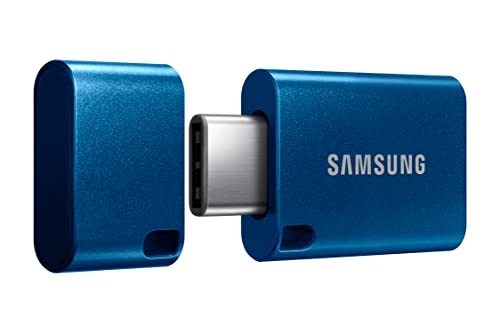 |
Samsung 256GB USB-C Flash Drive Fast branded USB-C storage |
Check Price |
 |
BORLTER CLAMP 128GB 3-in-1 Drive Multiple connector types |
Check Price |
 |
Vansuny 128GB Dual-Connector Drive Phone and computer transfers |
Check Price |
|
Samsung 128GB USB-C Flash Drive Lower-capacity Samsung storage |
Check Price |
Top 5 USB-C Photo Sticks: Detailed Reviews
1. LONGWIND 512GB Photo Stick
The LONGWIND 512GB Photo Stick For Samsung Phone gives you the largest capacity in this group, with room for thousands of photos and hours of video. Its USB-C connector lets you connect it to a compatible Samsung phone, while USB-A supports transfers to computers. You can back up files directly without Wi-Fi or monthly cloud storage, then carry them locally. Live Photo support preserves motion and sound rather than saving only a still image. The drive also includes a third built-in connector integrated into the USB-A connector, reducing the need for an adapter.
What We Like:
- The 512GB capacity gives you substantial room for photos and videos.
- Live Photo backup preserves both motion and sound.
- Direct, Wi-Fi-free backups can help free phone storage.
- USB-C and USB-A connectors support phone and computer transfers.
- Local storage keeps your memories accessible without a monthly cloud fee.
What Could Be Improved:
- The product information does not give a specific transfer-speed rating, so you cannot compare its performance precisely.
- The third connector is mentioned but not clearly identified, which makes compatibility harder to judge.
- If you only need occasional backups, 512GB may provide more capacity than necessary.
Buy it if your Samsung phone is regularly running short on space, you want the largest capacity here, or you need to preserve Live Photos with motion and sound. Skip it if you want a clearly rated transfer speed, need the third connector identified in advance, or only require modest backup storage.
2. Samsung 256GB USB-C Flash Drive
The Samsung 256GB USB-C Flash Drive is a compact Photo Stick For Samsung Phone storage option built with Samsung NAND flash. Its USB 3.2 Gen 1 connection reaches up to 400MB/s, with Samsung stating that a 4GB file can transfer in 11 seconds. You get enough room for up to 63,730 photos or 12 hours of 4K video, while the reversible USB-C plug works with compatible phones, tablets, laptops and cameras. Waterproof, shock-proof and magnet-proof construction adds protection for stored files.
What We Like:
- 256GB provides substantial space for photos and 4K video.
- Up to 400MB/s read speeds can shorten large file transfers.
- Samsung NAND flash supports reliable everyday storage.
- The reversible USB-C plug connects easily without orientation fuss.
- Waterproof, shock-proof and magnet-proof protection helps safeguard files.
What Could Be Improved:
- USB-C-only connectivity may not suit devices that lack a compatible USB-C port.
- The advertised 400MB/s speed is a maximum, so real-world transfers can vary.
Buy this if you want branded, high-capacity storage for a compatible Samsung phone and regularly move large photo or video files. Its compact design and protective construction suit travel. Skip it if your devices require USB-A connectivity or you only need a small amount of extra storage.
3. BORLTER CLAMP 128GB 3-in-1 Drive
The BORLTER CLAMP 128GB 3-in-1 is a Photo Stick For Samsung Phone that adds external storage through USB-C or microUSB, while USB-A connects to a computer, car USB port, TV, or speakers. Its USB 3.0 connection and high-speed storage chip are designed for quicker transfers than a basic USB connection, though no transfer rate is specified. OTG plug-and-play support avoids driver installation, and it handles common photo, video, and audio formats. Enable OTG before use, and remove your phone case if it blocks a secure connection.
What We Like:
- Three ports cover USB-C, microUSB, and USB-A connections.
- USB-A lets you move files between the drive and computers or other compatible devices.
- OTG plug-and-play support means you do not need to install drivers.
- The 128GB capacity provides useful extra space for photos, videos, and audio.
- It supports almost all common photo, video, and audio formats.
What Could Be Improved:
- Its 128GB capacity is smaller than the higher-capacity options in this group.
- You must enable USB On-The-Go on your phone before using it.
- A phone case may prevent a proper connection, so you may need to remove it.
Buy it if you use Android phones or tablets with USB-C or microUSB and want one drive for phone-to-computer transfers. Skip it if you need the largest capacity, use a phone without OTG support, or want a connection that works without removing a bulky case.
4. Vansuny 128GB Dual-Connector Drive
The Vansuny 128GB is a Photo Stick For Samsung Phone with USB-C and USB-A connectors in a compact keychain design. Its exFAT format is recognised by compatible smartphones and tablets, while OTG support lets you connect it directly to a phone without installing software. USB 3.0 enables fast data transfers and works with USB 2.0 devices, so you can move photos between a phone, computer, laptop, car audio system, or speaker. It supports Windows, Mac OS, and Linux, but your phone must have a USB-C port and OTG support.
What We Like:
- Dual USB-C and USB-A connectors cover phone and computer transfers.
- The 128GB capacity provides useful space for photos and videos.
- Plug-and-play operation avoids installing additional software.
- USB 3.0 supports fast transfers and remains backward compatible with USB 2.0.
- The keychain design makes the drive easier to carry with your everyday devices.
What Could Be Improved:
- It only works with phones and tablets that have a USB-C port and support OTG.
- The 128GB capacity is smaller than the 256GB and 512GB alternatives.
- USB-C compatibility does not guarantee support on every phone, so check your device first.
Buy the Vansuny if you want one small drive for moving photos between an OTG-capable USB-C phone and a computer with USB-A. Its dual connectors are practical and flexible. Skip it if your phone lacks OTG support or you need the largest storage capacity available.
5. Samsung 128GB USB-C Flash Drive
This Photo Stick For Samsung Phone is a compact 128GB USB-C flash drive for moving photos, videos and other files between compatible phones, tablets, laptops and cameras. Its reversible USB-C plug inserts easily, while USB 3.2 Gen 1 supports stated read speeds up to 400MB/s and Samsung claims a 4GB file can transfer in 11 seconds. The drive also works with USB 3.0 and 2.0 devices, making it useful beyond your phone. Waterproof, shock-proof and magnet-proof construction adds protection, and Samsung NAND flash supports dependable everyday storage.
What We Like:
- The compact design fits easily in a pocket or palm.
- The reversible USB-C connector is simple to plug in.
- Stated speeds up to 400MB/s suit large photo and video transfers.
- USB-C, USB 3.0 and USB 2.0 compatibility broadens its usefulness.
- Waterproof, shock-proof and magnet-proof construction adds reassurance for portable storage.
What Could Be Improved:
- The 128GB capacity is smaller than higher-capacity alternatives.
- It uses USB-C rather than offering multiple connector types on the drive.
- The stated transfer speed is a maximum, so real-world performance can vary.
Buy it if you want a small Samsung-branded drive for straightforward USB-C photo backups and fast stated transfer performance. Its durability claims and broad USB compatibility add flexibility. Skip it if you need more than 128GB or want one drive with several built-in connector types.
How to Choose a Photo Stick for Your Samsung Phone
Check the connector your phone uses
The right Photo Stick For Samsung Phone should match your phone’s physical port. USB-C is common on newer Samsung phones, but you should confirm your exact model before buying. A drive with multiple connector types can be useful if you also move files between different devices, while a single USB-C drive keeps the design simpler.
Choose enough storage for your library
Capacity determines how many photos and videos you can move off your phone before the drive fills up. A smaller drive may suit occasional transfers or a modest camera roll, while a larger capacity makes more sense if you keep years of media or record lots of video. Do not pay for more space than you expect to use unless you want one drive for long-term storage.
Match the drive to your transfer routine
Think about where your files usually go. If you transfer directly between your phone and a computer, look for a drive designed around those connections. If you mainly want an emergency copy of photos, ease of use and compatibility may matter more than maximum capacity. You should also check whether the drive’s required app or file-management process suits your phone, since a convenient transfer method is easier to use regularly.
Balance speed, brand, and portability
Faster storage can reduce waiting during large transfers, especially when you are moving videos or a substantial photo library. Brand reputation may matter if you prefer a familiar manufacturer, but it should not replace checking compatibility and capacity. Portability matters too: a compact drive is easier to keep with your phone, while a design with several connectors may offer more flexibility but can be less straightforward to handle.
- Confirm your Samsung phone’s port before ordering.
- Choose capacity based on your photo and video habits.
- Check how transfers work between your phone and other devices.
- Consider speed, portability, and the level of brand familiarity you prefer.
Which Photo Stick Suits Your Samsung Phone?
The LONGWIND 512GB Photo Stick is the best overall pick if your priority is maximum photo storage, giving you the largest stated capacity in this list. The Samsung 256GB USB-C Flash Drive is the best alternative if you want fast branded USB-C storage rather than the most room possible. Choose between them based on whether capacity or a Samsung-branded USB-C design matters more to your transfer routine.

Hi, I’m Mallory Crusta, the heart and mind behind LovelyPetSpot.com.. As a passionate pet enthusiast, I created this space to share my experiences, expertise, and love for all things pets. Whether it’s helpful tips, heartfelt stories, or advice for pet parents, my mission is to make the journey of caring for your furry, feathery, or scaly friends as joyful and fulfilling as possible. Join me in celebrating the incredible bond we share with our animal companions!